Unexpected: "Xcode 7 and Swift now make it easier for everyone to build apps and run them directly on their Apple devices. Simply sign in with your Apple ID, and turn your idea into an app that you can touch on your iPad, iPhone, or Apple Watch. Download Xcode 7 beta and try it yourself today. Program membership is not required."
Oh, that's excellent. I was just contemplating whether I really want to pay $99/year just to be able to sign a little Mac app, but if I can get all the iOS stuff too, I'll probably do it.
I'll admit that the right-click workaround is a minor speedbump but it does work.
And Developer ID certificates are valid much longer than a year, I believe mine expires in 2019. They aren't revoked if you stop paying for program membership, and the expiration applies to the signing operation, apps you've signed in the past will continue to work after the certificate expires.
I can do that, but it's not reasonable to expect my users to do so. As it is, indie developers have to choose between paying rent to Apple and having most users unable to open their apps.
I mean, really, you're comparing paying rent with a $100/yr fee (which now allows you to sign apps across their platforms)? Really? I highly doubt most indie developers even have to make that choice. Finding the $100 a year is not the most impossible task in the world, even for a tiny indie developer.
Plus, more than a few apps have added instructions on their download pages to show users how to get around Gatekeeper. They can clearly take the Gatekeeper hit, so you probably can too.
I could afford $100 a month. Affordability is not the point. The point is that Apple will block your app from opening by default unless you pay them a recurring fee, and if not, you must incur additional support burden to teach users how to get around the problem.
Yes, lots of apps do post instructions on how to get around it, but lots of apps do all sorts of user-unfriendly things. We Apple users used to make fun of Windows for the endless sea of pointless dialogs its users had to go through. Those apps could take the shitty-UI hit, mine probably could too, but it still sucks. A lot of people are intimidated just looking at instructions like that, and will just give up.
I don't know about you, but I feel like that's a pretty terrible first-run experience for my app. I don't feel comfortable charging people for something they might not even be able to run. Would Apple be willing to put their own apps behind that kind of painwall?
> I don't feel comfortable charging people for something they might not even be able to run.
Honestly, if you're charging users, then there's absolutely no question about it, you get the membership. Your entire "expecting the user to do so" point completely goes out the window the second you said it's a paid app. If you have the revenue, then it's simply a cost of doing business in the Apple world. Plus, once again, you're being way overdramatic. "might not even be able to run" is taking it a bit too far. Your app will be able to run. If you don't trust your users enough to click twice, then maybe you need to learn to trust them more. It's not like it's a hard thing to do, and it only needs to happen once.
Remember, this is Apple's OS, Apple's ecosystem, and Apple's SDKs. You play by their rules or not at all. That's the way it's always been, and that's the way it will probably always be (but never say never, look at Microsoft, they're doing things nobody would have ever expected). Yes, it sucks. Yes, it isn't fair. But as with all major companies, it never is. They will always have the upper hand because they're the ones providing the user base and all the tools necessary to get the apps out there and onto their machines. As long as you are developing for their platform, you have to play by their rules. Honestly, be happy they haven't moved the default to the much more restrictive "Mac App Store" yet.
And to be fair, I see where Apple (and Microsoft, IIRC they have SmartScreen which does the same sort of thing but to a lesser extent) are coming from. I'm sure that it lowers the chance of accidentally executing viruses by quite a bit and also slowly is teaching users to think before they execute (especially if you have to right click and click Open).
> Honestly, if you're charging users, then there's absolutely no question about it, you get the membership. Your entire "expecting the user to do so" point completely goes out the window the second you said it's a paid app. If you have the revenue, then it's simply a cost of doing business in the Apple world.
Yes, because Apple demands rent. They create a problem and then charge you to fix it. This is called rent-seeking. I think that is a bad behavior.
> Plus, once again, you're being way overdramatic. "might not even be able to run" is taking it a bit too far. Your app will be able to run. If you don't trust your users enough to click twice, then maybe you need to learn to trust them more. It's not like it's a hard thing to do, and it only needs to happen once.
I used to do tech support for a medium-sized office. I would frequently get called to people's desks because their computer wasn't working, only to find that their email client had put up a dialog with the message "The email address 'somebody@thatcompany.cok' is not a valid address", I'd have to verbally tell them they mistyped the address — sometimes, even after this, they'd just stare at me like a deer in the headlights and I'd have to type in ".com" for them before they felt like they could use their computer again. And then they'd do it again the next day.
I remember patio11 once shared an anecdote about a school teacher who called his support number because she thought Bingo Card Creator had broken Google. It turned out that she'd gotten a new home computer and Bing was the default search provider, and she couldn't figure out how to operate Bing because it wasn't Google.
I have to wonder if you have had to do a lot of support work, because I think you're trusting users way too much. There are many, many people who are really not stupid, but get flustered when doing unfamiliar tasks on a computer.
> Remember, this is Apple's OS, Apple's ecosystem, and Apple's SDKs. You play by their rules or not at all. That's the way it's always been
No, it isn't. It wasn't even this way just five years ago. I was one of the early adopters of OS X, and one of the things I loved about it was how open it was, so even some kid like me (at the time) could easily make software. Apple has gotten worse and worse about this over the past decade.
It is not just rent; it is a security feature. Whether this feature is being used wisely is another question...
A few months ago I sent Apple security an email about a fake Flash installer with a valid Developer ID certificate. It turned out that someone else had written an article about the same malware five days ago, and reported it to Apple, yet the certificate was not revoked yet - so it doesn't seem that Apple has a 'rapid response' system in place currently (or then, anyway), perhaps because incidents are still relatively uncommon. But they did promptly thank me for my report, and I bet they ended up doing something about it (I ought to check) - and thanks to Developer ID, they at least had some kind of payment trail as well as a name, likely making it harder for the same person to get additional certificates.
Of course, this trail could be achieved with a lower price. But you do get a number of benefits with the subscription, and since the Mac and iOS developer programs merged into one today, at the same $99 as each previously was individually, if you develop for both the price just halved. It's a start, at any rate.
>thanks to Developer ID, they at least had some kind of payment trail as well as a name, likely making it harder for the same person to get additional certificates
What's preventing me from paying some person in a third world country to get a certificate in his name?
Nothing does. But that person will likely have no loyalty to you, and would give every info he has about you to Apple for an additional $100.
You don't need to be NSA level to hide your tracks there, but it's not trivial either. And Apple is likely to work with the FBI/Interpol about that if whatever evil deeds your software does is sufficiently high profile. Theses guys might also not be good enough to catch you - but they have access to the NSA data for parallel construction, allegedly. And the NSA has incriminating evidence against you.
> No, it isn't. It wasn't even this way just five years ago. I was one of the early adopters of OS X, and one of the things I loved about it was how open it was, so even some 17-year-old kid like me could easily make software. Apple has gotten worse and worse about this over the past decade.
I never said that was the way it's always been. I said that "playing by their rules or not at all" was the way it's always been. Which is true, Apple is very big on controlling every aspect of the user experience. It was a matter of time before their massive obsessiveness leaked from iOS to OSX, but it's always been Apple's rules or nothing. Their rules for OSX have historically been very lax, but that wasn't my point at all.
> Yes, because Apple demands rent. They create a problem and then charge you to fix it. This is called rent-seeking. I think that is a bad behavior.
Well, they're providing a service for $99 that extends beyond the signing to be able to run in OSX. They include the ability to list in the various app stores, to have beta programs, access to early APIs, access to developer forums, and more. All that costs them money. They have to get that from somewhere.
> I have to wonder if you have had to do a lot of support work, because I think you're trusting users way too much.
I trust my users just fine. Just because there's one or two crazy stories (I mean, everyone has a few stories of horribly stupid users) does not mean the majority of users are that bad. If you're targeting all 100% of possible users, then sure, those instructions would be useless. However, I'd be confident enough to say that 90-95% (honestly probably leaning towards 95, but still) of users will be able to follow those incredibly simple instructions. So at that point, you have to ask yourself if the $99 (plus all the other perks like early access to APIs) is worth having those 5-10% of users who can't follow them. Because that's what it really comes down to.
I feel being a staunch Mac user from the beginning has been detrimental to me. My first computer was a commodore 64, which I typed the programs out of the book into the terminal and it made balls move around on the screen and such. But I was really young, and no one was there to catch me, so I never thought to fiddle with it, I thought it was like a set of instructions and you had to follow them. I did not yet understand creativity at that age.
I then later, many years later, was given a Mac Plus. I could use BBS software to chat, but remember thinking, it is very hard to even type a conversation back and forth to a user elsewhere with a modem. There really was no software for it, or if there was, it was hard to find or even know about.
How did you know to learn C and then get a compiler? And how did you afford the software to develop back then? Wasn't code warrior around several thousand?
Wow, your history matches mine quite closely (manually typing BASIC programs into the C64 whilst not really "getting it", then going on to the Classic Mac OS and onto BBSes). I first got into the Mac around System 6 with a Mac 512Ke, then onto a Plus and other machines from there... remember hacking at apps with ResEdit?
Also keep in mind that the standard language for the classic Mac was originally Pascal[1], not C.
In addition to Metrowerks CodeWarrior (which I also recall being pricey), there was also the Borland TurboC++ family. And starting from around System 7 there was MPW from Apple[2], which targeted a number of languages and was eventually free.
Well, I was talking about OS X, which was released around 2000, probably much later than your Mac Plus days. OS X included a whole Unixy environment and shipped the Developer Tools (GCC + the precursor to Xcode) on a second CD. I had already done some programming before that, though, in Mac game-making software (World Builder and Adventure Simulator), and with JavaScript on the Web, but the ability to really program my computer with Objective-C and Cocoa was amazing.
There was also a free development environment by Apple for OS 8 (maybe earlier, I don't know) called MPW. I think it was originally a paid product, but Apple ended up just giving MPW away because everybody used CodeWarrior. But I found it difficult to use and didn't get much further than some basic C lessons I found somewhere on the Internet. All the more advanced stuff I found wouldn't work (I think it was probably targeted at Windows or Unix, but all I knew at the time was that MPW couldn't compile it).
I'm having trouble finding the anecdote itself where the customer was angry about the change in Googles. Maybe it was in a podcast rather than on HN -- hard to remember, it was several years ago. Here's a later post where he was discussing what he'd learned from incidents like that: https://news.ycombinator.com/item?id=1808001
The "You broke my Googles. Give my Googles back or I'll tell my husband on you." incident was a customer who installed Bingo Card Creator N minutes before Google had systemic worldwide downtime due to an internal misconfiguration. (http://googleblog.blogspot.jp/2009/01/this-site-may-harm-you...) Her reasoning was "Google worked, I installed BCC, Google doesn't work anymore, accordingly, BCC must have broken Google." Except s/Google/the Googles/g.
My blue Googles/green Googles story happened with several different customers. Basically, they have a mental model of the Internet where it is a lot like a hard drive: your Internet at school and your Internet at home are totes different Internets and so it makes sense that the contents of one are different than the other. They call their Internets Googles, because Google "is the front page of the Internet" or "runs the Internet" or "makes the Internet." One of the Googles -- the blue Googles -- is what a technologist might more readily understand as Microsoft Internet Explorer configured to open to a Bing homepage on a school computer. This "blue Google" will, for any given query, produce different results than the same query run on "green Google" (Chrome/Google/home PC), hence providing further experimental evidence that the user understands adequately what is going on.
The difference between the blue Googles and the green Googles was chiefly relevant to my business in attempting to convince customers that, regardless of the fact that they signed up with an account from the blue Googles, they did not have to sign up for a separate account on the green Googles and then somehow move things from the blue Googles to the green Googles to be able to print them out at home.
Apple isn't forcing you to pay if you want to run your apps, they're warning users and forcing them to take an extra step to run unsigned code. That doesn't completely prevent malicious code execution but it definitely helps which is a net win for users.
Complaining that they ask for $100/year to use their official distribution channel (which incurs ongoing costs for them) seems unreasonable considering the quality and quantity of tools they provide for free. Xcode is a pretty awesome IDE considering it's free to use.
There's no way Xcode is the worst you've ever used unless your opinion is just based on personal preference (which is fair enough but not really relevant to the rest of us)
I don't think I'd say it's better than VS if that's all you're comparing it to, but it's pretty much on par. When I last used VS heavily it seemed marginally more robust than Xcode but the only real feature I liked vs. Xcode was the ability to use C# rather than Obj-C (which is less relevant now that Swift exists)
Other than that, every single IDE I can think of is relatively unpolished and if you're developing specifically for OS X then the alternatives are practically useless.
I'm really glad Xcode finally has automated GUI testing
The other IDE's I've worked with for any significant amount of time are Eclipse, Visual Studio, and various flavors of IntelliJ. Eclipse is the worse of the bunch, but it has a few important features that XCode doesn't. Support for a multi-monitor setup, configuration files that don't cause conflicts every other merge, a complete set of refactoring options. That XCode doesn't have a Search Usages or equivalent for a symbol, forcing you to use text search, is downright weird; they clearly use that functionality internally in the Rename refactoring.
Stability wise, there have been a few versions that crashed a lot, but that has improved lately, so I'm not complaining. And I do love how quickly it opens.
I'm currently using AppCode for developing for iOS, and I find substantially better than XCode. It has a full set of refactoring tools, that I use constantly, better search, it actually creates folders when you create groups (unless you tell it not to, and I think that's the sane default). I'm not sure it's a fair comparison, since it does cost as a much as a Developer License.
Everything. The way debugging is integrated. Interface Builder-- nobody has anything like that to compete with it. It's totally integrated so you can really develop efficiently, and the simulator makes testing quick and easy.
I've never seen an IDE that was anywhere close. I suspect that people who hate Xcode are simply familiar with something else and find it frustrating to use it (though they've spent a few hours with it and hundreds of hours with something else they're expect it to beat their old IDE with no effort yet spent learning it.)
Seriously, Microsoft and Google can't even do a competent UI on applications built for consumers. Their developer tools are terrible by comparison.
Are you kidding me? Look, I've been developing Mac/iOS for a while now (7 years). Xcode is mostly a piece of garbage if you compare it with the robustness of Visual Studio. I actually envy the MSFT developer tools, specially VS.
I've used XCode for hundreds of hours. It's very lacking in functionality, I'm not going to copy and paste my other comment.
Interface Builder is very nice, I will give it that. I did have it break on me once or twice(wouldn't let met add a particular kind of segue), and having to manually edit the generated XML file was a pain, but still, it is better than most similar things I've used.
What have you used instead? If you've used Visual Studio then it seems pretty bad to begin with. I used to use Codegear RAD Studio (C++ Builder) and that was OK until all the developers left and it became buggy, memory-hogging and generally bad.
XCode seems quite spartan compared to Visual Studio. VS will give you many panes left/right/bottom and a myriad of buttons to do things but xcode just gives you that pane on the left, and you will likely benefit from learning the cmd-1,2,3 etc. shortcuts to jump to the different pages of this "notebook".
The other benefit if the quick navigation at the top, the useful "callers/callees" access from the "four squares" menu top left of the editing area.
As someone else said, it has Instruments built straight in, the ability to monitor CPU/memory/disk and network and a much better thread stack view (xcode 5 was pretty bad with this I recall - you had to navigate using a popup menu).
You might get on differently with it if you're using different languages. I write C++ in it daily and I really enjoy it (clang is quick). The ability to do static code analysis and have it annotated in the editing window is really really really really great. Lack of refactoring with C++ is a bit sad but not a massive issue for me. Whenever I go back to using Visual Studio I find it to be clunky and there's too much on screen (popups, toolbars, etc.) but that's just me. Also, the glitching and artifacting when VS redraws is irritating (might just be a side effect of running in a VM for me), and the "stop build" takes too long thanks to the compiler running in a hidden window. I ought to upgrade to a more recent Visual Studio as I have to use VS2010 at work for now.
Compared to Eclipse and Android Studio, Xcode is good! I find Eclipse and Android Studio to be slow, and they typically break every upgrade. (AS is currently complaining about a modified ant.jar and refusing to upgrade... wasn't me who did that!)
Having said that xcode currently crashes once a day for me. Not sure if it's in the preprocessing/indexing phase as it falls over with large numbers of #defines and ~80k lines of C++.
> A lot of people are intimidated just looking at instructions like that, and will just give up.
You realize it's probably one of the easiest tasks ever, and it's literally 3 steps. Anybody even my grandma can do that. If they know how to download your app and "install it" they will be able to do those simple steps.
And it's a one time thing, not like they need to do it every time they go to install an app.
Anybody can do it if they're of the right state of mind, but as somebody who used to do IT for a medium-sized office, all I can say is you're mistaken if you think most people are that way. The task is intimidating and involves 1) going through a context menu (something many Mac users will never even have done before), 2) dealing with a dialog (people get nervous the second a dialog shows up and often don't even read them), 3) if they have read the dialog, ignoring the fact that they're doing something it's telling them not to do.
> (something many Mac users will never even have done before)
This isn't the 90s. Two-button mice are the default now, and have been for many years. I'm pretty sure everybody has done it at least once, and probably even knows what the term "right-click" means.
> ignoring the fact that they're doing something it's telling them not to do.
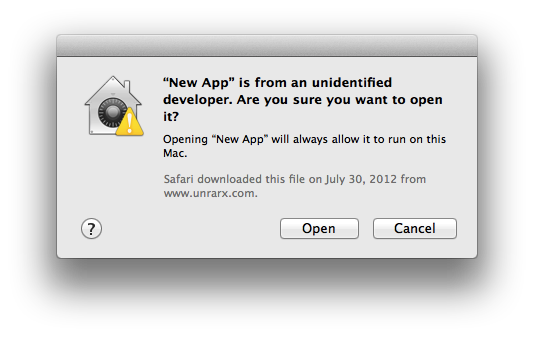
They're not doing something it's telling them not to do. Have you even looked at the dialog? Have you read it yourself? It simply asks the user if they're sure they want to open it as it's from an unidentified developer: https://support.apple.com/library/content/dam/edam/applecare... Nothing in it is telling them they shouldn't or can't open the app, they're not going against anything by saying "Open" (in fact, that might just be why there's an Open button there in the first place, because it's an acceptable choice).
Seriously, you're being overly untrustworthy about your users here. You seriously can't think this is that big of a problem. Because it isn't. Other apps have managed to solve this with download instructions, it's really not difficult, and the fact that they're still alive and running shows that users clearly know what they're doing enough to right click once and press Open once. It's not a difficult task by any means of the imagination.
If they're following the developer's instructions, then presumably they wouldn't even see that screen. Remember, we're talking about the steps needed to open the app, not what would happen if they tried to open the app normally.
I mean, that said, most instincts would be to double click the app right away, ignoring any instructions, but that's a separate matter of how to best present those instructions for your users.
I don't think there's any possible way to present the instructions such that people will read them, if those people are in a flow state. People only even read the instructions once their cached reflex of how to do the task doesn't work out for them and they "wake up" a bit.
I'm not sure if this is a joke??? Context menus are difficult?? How do you open in a new tab in Safari if context-menus are so alien? How do you force an app to stay in the dock or open at Login? How do you change the desktop background?
Dealing with a dialog: it's just another window, just smaller than the main one.... OSX != iOS. (Actually, how do people cope on iPads when it says "5% of battery remaining"? Do they lob it at the floor in fear of the dialog window?)
There's little developers can do if people don't read the text. That's not a developer's fault. Should we put fences up on dangerous beaches to stop people swimming or should people just read the sign saying "no swimming, dangerous currents"....?
Philosophically, it is a bummer. Instead of a developer and customer having a direct relationship, there's now an Apple tax that needs to be paid every year or the relationship gets cut.
However, I can't think of any other way to gain the security benefits of app signing.
Ultimately, all security is a web of trust. If you're going to put an automated, self-service system at the root of that web (the Apple dev program), then you need reliable ways to establish identity and discourage high-volume fraud. A $100/year credit card charge does both pretty well.
As a developer and a user, I more or less like the system. I feel general users get a decent amount of added security without too much hassle.
Thinking of the unsigned applications that I do run, if you know about them, I don't feel it's unreasonable to expect the user to know how to get around the signing.
Personally, that is a total game changer for me. I have an app idea, to build a custom house management app for my wife and I. I really don't care to put it on the app store and I don't want to pay $99 for a two person app. Now I can make an app that only my wife and I will use.
This is the first time you could install apps on your device without paying for a membership. Previously you could design and test through a simulator for free, now he can build and actually use his app without paying extra as he isn't distributing.
I think you two are talking about different things. You could always distribute to OSX devices. However, now is the first time ever when you can run your app on an iOS device without a membership certificate from Apple. This is very good news.
It never was the case that you had to go through the app store to deploy an app for personal use. The only requirement was to have a paid iOS developer membership.
Maybe this explains the recent bug I experienced where, when attempting to renew my iOS developer program for $99, the system added the Mac developer program to my cart for an additional $99 (which I didn't want).
It will probably have a really short code signing certificate expiration date, so you'll have to rebuild and reinstall all the time. They'll probably notice when 100000 users debug-sign the same app ID too...
Re-signing could be done automatically when you plug your iDevice (unless TTL is really short like 1 hour). App ID, hash could be changed easily as well.
This was the big news IMO. Many would-be developers reside in countries where $99/year is a huge amount of money that cannot be justified until they have a final, working product they are ready to distribute.
Did you read what he said? It doesn't matter when on the world he lives because his argument is based on a ratio, and that's invariant.
That people that can drop money on Apple hardware but can't afford $100 per year doesn't make sense, for the obvious reason that Apple hardware costs many times that.
Back when I was at school I developed some iOS apps, and the $100 was huge where I lived. That's literally 1/4 of minimum salary there. I worked the entire summer holiday to afford an old mac mini(which was really crap,but that was the minimum spec which could run Xcode), and then actually had to borrow money to pay the $100 fee. That's why I prefered android from the start - it was just easier to start developing, with much smaller fee and no membership required to actually deploy to Android devices.
> Yet those developers somehow can buy a computer for $1000+ and spend an additional $500-$800 on the tablet/phone? :)[1]
In a word - Yes.
I am a developer from a 3rd world country, and I bought a Mac Mini for $500 (not '$1000+') for the purposes of entering the Apple ecosystem. I'm not going to spend another $500 on an iPhone[2], especially since I'm not sure if it will work out financially. The emulator will have to do (my apoligies to anyone who'll potentially run my apps and encounter bugs I miss because of this).
1. I'm not sure if the smiley is an indicator of sarcasm or not
2. If push comes to shove,I can afford it, but I've already bought the phone I'll use for the next 2-3 years (OnePlus), and I'd rather spend the money on other things - like family.
If you're serious about making an App, then yes, you should spend the $100. You will get it back in the first couple of days if you make a good app.
The $100 is to keep out the shovel ware and crap-- look at all the junk in the store as it is now. Imagine what it would be like if there wasn't that $100 barrier to entry?
> You will get it back in the first couple of days if you make a good app.
Well, there's the rub. Unfortunately, the vast majority of developers just don't make money on the app stores. I'm not going to beat myself up if it doesn't work out - I'm taking this as a long-term learning opportunity.
If one of my apps takes off on Android (as proof that other people find it good - or I'm confident it is good enough), then I'll pay the $100.
When I recently worked on making our installer work on Mac OS X again (it broke a few years ago, and we don't have a lot of demand for Mac OS X, since we build server software), I did so in a VM on my Linux system. It was slow, it was ornery to get it working, but it was free (if we assume a pirated Mac OS X, though I have a purchased box of a slightly older version than the one I was able to install from a prior Hackintosh experiment that I gave up on, since I found I hate Mac OS X through and through).
I would never build for Mac or iOS if I had to buy a Mac. Since I was able to do so effectively for free, Mac support in our software (which is pretty popular with about 3+ million downloads a year) got a lot better. I didn't enjoy it, and I won't be using that VM for anything other than testing Mac OS X support, but it's silly to act like everyone ought to be willing to shell out money to support a platform (especially in our case, where the vast majority of our paying users are running Linux).
"look at all the junk in the store as it is now. Imagine what it would be like if there wasn't that $100 barrier to entry?"
Whatever happened to the argument that the Apple approval process was to protect users from poor quality software?
Not everyone making iOS apps has Apple hardware. I was just at a React Native meetup in Bangalore where half the audience was on Dells running Ubuntu, trying to install hackintosh VM's so they could use XCode and the emulator.
The passion for building things doesn't only strike those with four figures of disposable income, you know :)
No, they can't. You can run mac operating systems on any cheap intel hardware (and in vmware), and you can easily buy used phones/macs on eBay. Google the term Hackintosh or "vmware mac".
Though note that there's a current bug listed that looks like accounts with expired developer memberships currently can't use free provisioning.
(For me, this is mildly irritating, because I let my membership lapse a few days ago on a hunch that they'd combine the developer programmes. And then they did, but I can't use the free provisioning, and the re-enrolment form doesn't seem to be working right now either.)
Thanks, but I managed to re-enroll via iTunes Connect instead. Though why a $99 developer program costs £79 in the UK I have no idea, I guess it's VAT. Hopefully I'll finally get an app out to justify it this year!
Is this a path to non jailbreak sideloading at least for users with OSX and Xcode7? Not exactly likely to make a splash but interesting move if you can share these projects without too much fuss.
More generally, this is an awesome move. Kudos to Apple :)
This is awesome. I might get back into iOS app development. I didn't feel like paying money for prototyping just so I could run it on my own device. Emulator wasn't doing it for me. Time to pickup Swift.
I love this. I'm thrifty and haven't paid for a dev account but am deep into an app build. When I show clients, there's a bit of an awkward conversation when I explain that I have to show them on my macbook. If I could demo directly on my phone/tablet that would be amazing. Can't wait to use this feature!
Sure, cheap/thrifty whatever. However, I'd rather pay for the dev account when I actually need it. I don't see a huge benefit to paying $100/year while in development. I can accomplish everything I want without it. Once I'm ready to publish the app in the app store, I'll gladly pay $100/year.
Ya I could see that, however I should note the app is only a part of a bigger picture of products. I've also been developing it for the past 4-5 months but only started showing it to people lately. So perhaps now would be a good time to buy a dev account but I still haven't felt the big need. To each their own.
Not sure why this is downvoted. I find it totally appropriate to criticize marketing speak that is masked as technical description.
Regarding Apple, I find it inappropriate (and dishonest) to use the word "advanced", when it is just catching up with a commodity feature. Exceptions are provided by almost every other modern programming language in the world.
I guess that you have to prefix any statement that might throw with 'try', and cannot prefix other statements with it.
If so, their motto really seems to be 'explicit over implicit'. I'm not sure that is an improvement, but I'm not sure that it is bad, either, provided that the refactoring tools work fine (for example when one removes that "throws" from the definition of loadData)
Doesn't that mean typing try a million times instead of putting potentially throwable calls inside one try block and a bunch of different catch handlers?
I wonder why they insist on that. Perhaps it is easier to parse?
I suspect it's useful to visually signal that the call can fail, and make it obvious what's happening; after all, the "throws" annotation is at the target site, not on the caller end.
You need to prefix anything that throws with a "try":
Other than that, it looks exactly like C++ exceptions: Propagation happens along the chain of functions marked as "throws", until a "catch" handler intercepts it.
"try" is an expression, by the way, so you can do things like:
let line = try file.readline()
There's also a "try!" statement that throws a runtime exception if the inner statement throws.
You have to understand though, Swift is like a really nice wrapper around Objective-C. Imagine adding try/catch to C programming language? I know python & java and all of today's relevant high-level languages have it since forever, but implementing that in something that wasn't designed for it from the start is a big task. I'm by no stretch of the imagination an Apple fanatic but as a person who is about to send out their first mobile app, which happens to be for iOS, I acknowledge the difficulty of adding try/catch to Swift... and by extension any Obj-C or plain C used in that same XCode project.
While Swift was designed to interface well with Objective-C and runs on the Objective-C runtime, it is not a wrapper around Objective-C. It was written from the ground up, started by Chris Lattner at Apple.
Obj-C already had try / catch, it just wasn't considered idiomatic to the platform. Amazon caught a bunch of flak when they wrote an Obj-C interface to AWS and all of the error handling was try/catch instead of NSError (probably, they just line-for-line transliterated their Java interface).
"The standard Cocoa convention is that exceptions signal programmer error and are not intended to be recovered from. Making code exceptions-safe by default would impose severe runtime and code size penalties on code that typically does not actually care about exceptions safety. Therefore, ARC-generated code leaks by default on exceptions, which is just fine if the process is going to be immediately terminated anyway. Programs which do care about recovering from exceptions should enable the option."
"Xcode 7 has a ENABLE_BITCODE option to embed bitcode in apps, app extensions, and frameworks. The option is turned on by default for iOS and is mandatory for watchOS projects submitted to the store.
When bitcode is enabled for a target, all the objects, static libraries and user frameworks used when linking that target must contain bitcode. Otherwise, an error or a warning will be issued by the linker. (Note: missing bitcode is currently a warning for iOS, but it will become an error in an upcoming beta release of Xcode 7.) ENABLE_BITCODE should be consistently turned on for all the targets. If you use a library or framework provided by a third party, please contact the vendor for an updated version which contains bitcode."
Dear God, do we need to wait for all libs to update? :S
Agreed, this is an insane requirement. Our app uses commercial libraries from closed source vendors, some of which are no longer distributing newer versions of their libraries. If this becomes a requirement, we will not be able to ship our app because we can't deliver the entire thing in bitcode.
> Our app uses commercial libraries from closed source vendors, some of which are no longer distributing newer versions of their libraries
This is the insane part - you're relying on things you have zero control over and zero support for. Apple's requirement is no different than some fatal bug discovered or backdoor discovered in those libraries - except Apple is giving you some notice without immediately putting the liability on you.
That's not so much of a bitcode problem as a vendor problem. You'd have the same issue when 64bit builds became mandatory, or when uidevice.uniqueIdentifier was banned.
Wow, that's quite a change! Is this some kind of intermediate LLVM language? Sounds very Java/.NET-like. I can see how it's nice for future proofing (i bet you can even change from ARM to x86 then!), but you're handing a lot of control and probably something much closer to the original source code over to Apple.
Is there a fundamental change of architecture planned for future iOS devices?
My guess is that it is future-proofing towards running iOS apps on Mac OS and/or running (parts of) iOS apps on the Apple Watch. It also might mean that Apple plans to make their own ARM extensions (for example, I suspect having the CPU know about tagged pointers, so that an 'add' instruction can do an indirection, if needed, might be an overall win)
Update: the release notes for the Xcode 7 Beta say:
"• Bitcode. Archive for upload to the App Store in an intermediate LLVM binary representation that the store can then optimize into the 64 or 32-bit executable to be delivered to customers."
This falls under a feature they call 'App Thinning'. It makes the App Store optimize an app for the device it gets installed on, CPU-wise and asset-wise, and also allows your app to download some resources on demand.
> also allows your app to download some resources on demand.
Oh boy; if this is the start of apps lazy-loading resources and code, I'm really excited. It's the largest barrier to signing in your account from any device.
Along those lines, John S. just tweeted "<whisper>ARM Macs…</whisper>" [1], which is interesting, as he also got the Open Sourcing of Swift right a couple of days ago.
Interesting, although the open sourcing of swift feels more obvious than arm macs. Bitcode and app thinning are currently ios+watchos only. I think it sounds more likely for ios and especially the watch changing architectures in the future rather than a non-x86/64 osx. But I'm probably wrong.
What would be the selling points for an ARM MAC? Access to the iOS app store software library? (unlikely) Better battery usage? (maybe) Super cheap devices? (un-apple-like)
Changing archs has been done before but I don't see a rosetta for intel apps running smoothly on arm. Virtualizing windows and linux is another killer app for intel macs that would be missed for some.
You're giving up a lot of performance for that battery life, however, and I think it's probably premature to even think about ARM Macintosh for three years at the least, if ever.
Not even a mention of refactoring tools for Swift? Right now you can't even do a Rename. This was one of the biggest reasons I bought Appcode, actually. And I'm still waiting for either IDE to implement Extract Method.
It boggles my mind how little I hear people complain about this. Aren't these basic tools by now?
I feel like a lot of basic stuff is broken or non-existent in Xcode. For instance, project text search on my machine freezes up the entire IDE for half an hour, which is ridiculous since A) it's not an unusually large project, and B) it's on an SSD, and it should be running search in a separate thread anyway.. Not to mention last time I used Xcode (6.2) it crashed on me 7 times in the span of an hour on basic things, like unlocking a file. I wish apple would focus on getting the basics right. It sucks because there's not much of an alternative, but it's by far my least favorite IDE to use.
Is your search scope too broad? Too many Pods maybe? I've never had an issue with project text search. The only time I've ever had that many problems in an iOS dev workflow was years ago when I was briefly running OSX through VMWare.
There's something else going on with your environment, it shouldn't be giving you this many problems.
Does xcode use Spotlight for search? I don't think it does. It clearly pounds the disk when searching but as Spotlight is optional and you can choose to not index various locations, relying on Spotlight for search (and being unable to search locations x, y and z) would mean that xcode would not find results in x, y, and z.
Wait, you can't auto-rename stuff? I noticed in an older version of XCode (when I still bothered), that there were really basic refactoring tools missing for C++, but I assumed that was just because Apple hates C++. Apple obviously doesn't hate Swift.
Most likely Apple is still working out the internals of the Swift compiler. Refactoring requires a thorough knowledge of code paths and object lifetimes.
Once Swift 2 is nailed down, I'm sure refactoring will follow.
Even in Objective-C, the refactorings available are pretty limited and don't always work. You can do Rename and Extract Method. In a few corner cases, Extract method will break. Forget about extracting a variable or a parameter, of pulling a mtehod up toa superclass. Also, the fact that you have Rename but you can't find usages for a variable of method seems to me jsut lazy or ill-thought.
It is a very odd feeling to miss Eclipse, but back when I worked in XCode, that would frequently be how I felt.
I remember having access to Refactoring in an old Objective-C project, but it was far from "refactoring" - it would have been better named "find-and-replace", considering it substituted some occurrences of the word in question in comments, strings, etc, often with incorrect casing.
Am I the only one excited about nil flags and generics support in Objective-C? I think it's really nice to have an NSArray full of MyObjects that is type checked compile time.
Every year the new XCode comes, and I'm less excited about new features and more worried about how many more Macs will I have to buy. Last update on XCode 6 made it impossible for some 2012 models to run it.
This update is almost surely for Yosemite and above. The cost of developing on Apple platform is crazy these days. I miss the days when they could mock Microsoft for having an expensive Visual Studio. Now they make you buy a new Mac per developer every 2 years.
I'm running a 2008 Mac Pro running Xcode 6 and Yosemite. I have a 2012 MacBook Pro at home running Yosemite and Xcode 6 (but my word is the hard disk in that slow - luck of the draw getting a 5200 Hitachi or a Samsung, eh!!!)
Macbook Air 2012 models with 4GB soldered RAM ran fine on Mavericks and XCode 6, until Apple decided the newest XCode 6 to be Yosemite only. Now Yosemite is free, but is absolute abonimation on 2/4GB machines. On top of that, you have to run XCode. Not to mention the time debt required to upgrade.
Now, for indie developer setting, these issues might not be huge. But the problem here is - Apple puts businesses in awkward positions, when they have to bulk buy RAMs and upgrade all the systems just to compile on the newest minor release of iOS. Then, they started soldering RAM, so now to compile on 8.3, buy 25 new Macs or fuck off.
Apple's actions that screws us - solder RAM, make only latest XCode work with latest SDK, make OS impossible to run on low RAM, make XCode run only on newest OS.
Well that is just stupid, the macbook air is not a dev machine. Get a macbook pro or an imac and you are fine. Apple did not screw you, you screwed yourself for buying the cheapest they had to offer.
Chris seemed to indicate that this migrator will also somehow handle the migration from NSError-style error handling to the new try/catch. I'm very curious to see how sophisticated that will be.
Funny you should mention that. Quoting Apple's own docs:
> Objective-C lightweight generics are ignored by Swift. Any other types using lightweight generics are imported into Swift as if they were unparameterized.[1]
So it doesn't look like the goal here is Swift interop.
I'm really excited about code coverage, and the built-in user interface testing support. That's amazing. We currently write our acceptance tests with KIF, but this sounds so much better. Looking forward to playing with the automated test recording.
I saw them as being more of a replacement for UITableView for the cases where you don't need all of its dynamism (cell re-use, etc), and whipping together half a dozen static table cells involves too much ceremony. In fact I was hoping I'd be able to use Stack Views to get in the ballpark and then do final tweaking with AutoLayout...
I doubt it. The last version of XCode 6 won't run without Yosemite, so I'm guessing 7 will require Yosemite.
Also it's very hard to run with 2gb ram. For example you won't be able to use the iOS emulator because the swapping will take so long XCode will timeout when trying to launch the emulator. It's very painful even with 4gb. 8 is probably the minimum.
You say you can't upgrade the computer, but surely you could throw some extra memory in. You could increase it to 8GB for around US$60 and benefit from a substantial improvement in performance across the board.