Given that Apple still sells an 16GB iPhone (for some baffling reason) I wonder what percentage of users will not have the necessary 4GB of unused space.
Anecdotally, Several of my officemates have had this issue.
With my 2.1 GB of unused space I had no issue installing this update. It's a delta update so the size will vary. Mine requested about 200 some MB if I'm not mistaken.
Sorry for being confusing - I don't disagree it's popular model. What I don't understand is why Apple's baseline model has 16GB. It seems like flash memory can be had very cheaply - Amazon shows several examples of 64GB MicroSD cards for ~ $25.
It would seem like starting their base model at 64GB would be very consumer-friendly, and have a very low cost.
But it doesn't matter to software developers, especially small developers. Catering to jailbroken phones and people who don't like iOS7 is an opportunity cost that would only hurt. It's almost always better to use the new API's, along with bug fixes in the latest version.
Me too, and most apps are still compatible with iOS 6+. I am a fan of "skeuomorphism". As Steve Jobs died and Scott Forstall had to leave Apple. I am no so fond of Mr. Cook's and Ive's design choices.
http://en.wikipedia.org/wiki/Skeuomorph#Arguments_for_skeuom...
I've been running the latest beta for a while, and I'm updating my devices now. Here's my beef:
This came too late. For months now - ever since iOS 7 came out, I've had to tell people "iOS 7 is great, but buggy. Don't worry, Apple will release 7.1 soon that will fix a lot of these issues." Time, and time again, I said that. With each beta it became more and more obvious that Apple wasn't releasing a quick fix for the myriad of issues that plagued users.
I think Apple did this wrong. 7.1 contains new features and updated UI elements. Fuck that. I wanted the hundreds of bugs that were impacting users to be fixed back in October. I expected the new iPads to be running 7.1. I think Apple should have focused solely on fixing the bugs present for 7.1, and then released 7.2 that had these features. But since September 18th, (173 days ago!) I've been dealing with a buggy OS and been apologizing for it [0].
To me, that is unacceptable.
[0] I'm a big Apple fan, and develop iOS apps, and a lot of people in my circle come to me with their Apple questions.
This is interesting - I've been using iOS7 since the day it came out and don't think I've seen a serious bug yet, certainly not hundreds of them. I really am curious - is it the hardware (iPhone 5s here) or different usage patterns? I'm a developer too, and just haven't had this experience. Please let me know a couple of the specific bugs you've seen, as I'd like to try and recreate them before upgrading to 7.1
Oh, I've had this one too (on an iPhone 4.) As far as I can tell, it's caused by switching cell towers on 3G/4G; you suddenly get apparently-great signal strength, but no service whatsoever.
I've found that entering and leaving Airplane mode fixes things, presumably because it causes the phone to notice which cell it's actually connected to now.
In order for this to be effective in the app you have open, though, you have to stay in Airplane mode long enough to time out whatever TCP connections the app is attempting. Tower-switching is a purely physical/routing-layer effect, so you still have the same IP, and TCP connections stay established. If you trigger the carrier renegotiation without staying in Airplane mode for long enough to drop your DHCP lease (usually about three seconds, I think?), the phone will go on waiting for a reply to a TCP SYN that never actually hit the tower, so you'll find, like you said, that you may have to kill-and-restart the running app to get it to work.
iTunes Music has been horrible for this. I'll stream some music, then hit pause and walk away for a while.
When I come back and hit play, most times it'll play out the buffer and then decide it has no internet connection, fixable only with a kill-relaunch. And some times it'll reboot the device altogether.
Oh that reminds me of a couple more. Tons of lag and crashes in the iTunes Store app, and tons of lag in Podcasts, along with chunks of the episodes lists showing up white when I knew there were episodes that should be there.
I also had an issue where around half of my music got corrupted during a sync. It acted like everything was fine, then as soon as I tried to play a broken song it would just skip it. Which was particularly irritating because it made "previous song" via 3-clicks on the inline play/pause button stop working. I'd have dead spots in the middle of playlists that I couldn't rewind past because it would hit them and immediately jump to the next song.
Resyncing seemed to fix the audio, but ran out of space because it left behind 4 gigs of cruft in "Other" that the storage page in settings couldn't account for anywhere. I had to do a restore to get everything working again.
So all in all, my experience with iOS 7 haven't been great.
EDIT: One more complaint in the design department, even though I don't mind the iOS 7 style as a whole. The new Music app is very clearly designed for the iPhone 5 and up with taller screens. The scrubber has gotten a lot harder to use, and if you're not precise enough you'll end up setting the song's rating instead.
For what it's worth, I've had horrible performance in the iTunes App Store since my first day with my first iPhone. And the switch to the new store 'style', heavy on pop-ups instead of directing to distinct pages, has been worse than before.
I don't think I've ever had an acceptably performant session in the App Store, at any time of day, on any device, from any network. Even direct links to app pages from other web pages have always been slow.
So I'm not one who'd be able to notice new 'lag'. But I haven't had any crashes.
The "Other" space tends to be MMS messages. If you're not manually clearing conversations, those pictures, videos and sound files are just getting filed away forever. They really need a fix for that. If nothing else, offering a setting to automatically trim conversations to only the most recent X weeks.
Not MMS here, I'm using Google Voice, and any MMS messages to that number just vanish into the ether. Only a couple of people have my "real" phone number.
The Other space ballooning definitely coincided with the music syncing bug. Before that it was a barely noticeable sliver in the space meter.
As far as App Store, that one actually runs well for me. It's only the music store that sucks.
The app store is so painfully slow even over wifi. It used to be much better before the switch to the screenshot-heavy layout. I like the screenshots in theory, but it is so slow that it makes browsing apps feel like a huge chore.
On a 3rd gen iPad here and by far my biggest issue has been that multiple background downloads (a batch of app updates or track downloads from the store for example) will more often than not cause the whole device to deadlock, with the only way to recover being to do the power + home button hard-reboot combo.
Really hoping this was fixed in 7.1, which I'm running now and so far seems smoother (doesn't stutter anymore when switching to the task switcher view, for example).
The other persistently anooying bug I've seen has to do with text fields on some webpages (eg Outlook Web Access and the Amazon Kindle web app) where if you tap to change the cursor position inside the field, you can no longer type characters in it and have to deselect the field (by tapping another on the same page) and then reselecting it again. Makes fields on many pages simply un-editable (the Amazon web app is the worst as you have to leave the store section entirely and it breakd the product Search field). Not sure if it's page or Webkit specific but it'a been around unfixed even on iOS 6 if I remember right. Fingers crossed on that one :)
* the music player corrupts itself and starts skipping all songs, may or may not be fixed by rebooting the device. May require resynchronising all the music (remove/readd everything)
* it regularly decides to stop opening sync sessions with iTunes and has to be rebooted
Apart from that it's been pretty smooth sailing.
Oh yeah, and every single update re-enables bluetooth, that's annoying.
The only bug I've seen is that the device would restart itself on occasion. There was a critical bug right when iOS7 came out where if you tapped define in mail or notes, it would completely freeze the app. Seems to be fixed now.
Then again, I wouldn't say I'm a heavy user. I mainly use it to check on my mail, read some news, etc.
The cell phone modem is a separate hardware piece in your phone, it has its own operating system. The smartphone OS communicates with the modem over an interface usually using "AT" commands. The iPhone 1-4 had an cell phone modem design by Intel (GSM version, modem manufacturer got bought by Intel).
The iOS UI consists app(s), so it may crash and restart.
That one (screwing up the music library) has been annoying me a fair amount lately. I've had to re-load my music library two or three times since iOS 7.
I disable it because I've absolutely no use for it, and it's one more possible attack vector on the device. I've no idea if it has an impact on battery life (and it's probably not much of one in the context of my normal use of the device).
The problems I've experienced, and this is in no way restricted to iOS 7 (goes all the way back to the first iPhone in fact), is that the apps that are the least reliable, most likely to crash or have obvious bugs are those written by Apple themselves. I too am a developer and I love Apple products but wtf?!
My 5s has definitely been a bit buggy but I'm putting that down to "whole new 64bit OS and SDKs and app developers who never follow the documentation and whoops, now it's all gone to cock when things change".
I do wonder what happened with this release. Beta 1 came out ages ago on November 18th. My guess is that CarPlay got added to the iOS 7.1 content, and then that had delays, and then had to be properly announced at a big motor show.
> "iPhone 4 users will enjoy improved responsiveness and performance"
I hear: "iPhone 4 users will be slightly less screwed over this time". I am updating as fast as I can, because frankly, nothing can be worse than the iOS 7.0 upgrade that I (regrettably) did.
No matter how iOS 7.1 works on my iPhone 4, I will remember how I got screwed by the 7.0 update. In the future I will never upgrade to a major new OS version without waiting several weeks and seeing how other people's devices behave. The trust has been broken.
Making a new version of iOS that doesn't run as well on older devices — that's fine. I understand that iPhone 4 wasn't a priority (but note that in spite of what many people mindlessly repeat, iPhone 4 performance problems were not because of "new animations and effects").
What I have a problem with is:
* pretending that all devices should be upgraded, even though iPhone 4 clearly should not have been included given the abysmal performance,
* disabling downgrades (it's not that they are technically impossible, it's that Apple specifically disabled them after several days),
The goal was to show how unified the iOS ecosystem is: so-and-so-many percent of users upgraded immediately, there is one version to develop for, etc — but I was sacrificed on the way to that goal. That is not OK.
Net result was that for several months my phone was a useless piece of crap, taking forever to do anything, missing taps and swipes, taking screenshots of the lock screen instead of switching on, etc. That is not OK.
In the future, warn me that there are performance problems and that the upgrade is possible, but not advised. And give me the possibility to switch back.
Yeah, I got burned with 7 too on my 4S. Luckily my iPad3 is still on 6.
Its rather annoying that Apple forces you to stay on the current version once you update especially when the newer version slows down your device at the same time.
One major question that I have for everyone who upgrades iOS on launch day is, "why?" Nobody upgrades non-Apple operating systems on Day 1. Sometimes people wait for an entire year to upgrade the OS, because the device is functional at the old OS and risks becoming nonfunctional with the new OS.
Yet I continue to see people upgrade OS X and iOS on launch day, often with predictably regrettable results.
I make my kids upgrade their iPads first then test them thoroughly before I do my wife's iPad and iPhone.
With respect to OSX I go for a major release straight away and test it for a couple of hours. If it's broken, I'll restore the machine from Time Machine.
All the Apple users I know do roughly the same process. They're quite conservative and pick guinea pigs before they upgrade.
I've always upgraded everything as soon as possible. This is code that has been written to improve existing code. Bugs have been fixed, security issues patched. Testing has been done, and it's good enough to push to customers.
I've always done this, and short of when I used Debian Sid (I think it was), I've never been bitten by it.
Having recently switched from an iPhone to an Android smartphone, I really question the "most advanced mobile OS" claim. Apple phones are more polished, more logically organized, easier to use, more intuitive... fair enough. But more advanced? Not by a long shot. The amount of features and customizable options on Android is insane. You can argue that this is not necessarily a good thing for the average user, but you can't make the claim that iOS is more advanced. It's simply not.
EDIT: OK, fair enough. The word "advanced" is very subjective and means different things to different people.
You can't make the claim that a greater number of features makes something more advanced.
Especially when many of them are poorly implemented one-offs on one model on one carrier for a few months before support and updates are cut off permanently. (Why the hell should something like screen sharing be a feature of one particular model?!?)
In terms of actually working, the iPhone is lightyears ahead of huge swaths of the Android ecosystem. Maybe not Google Nexus, but then you're locked into the inferior network coverage of AT&T or T-Mobile.
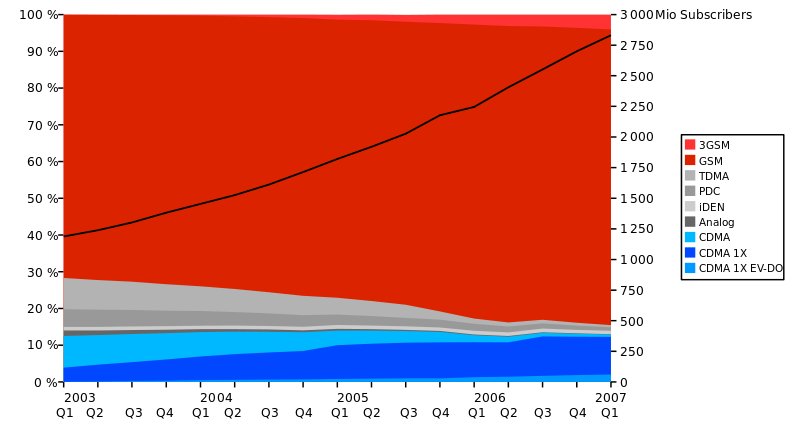
Not really. I think the better term is locked out of the ancient CDMA networks of Verizon. Nexus series is GSM, which is used globally, except for Verizon in the U.S.
Samsung (w/ Verizon) install so much bloatware on their new Android phones it is bordering ridiculous. Why would new Galaxy S4 users want an uninstallable NFL app?
The Motorola and LG Nexus android phones are comparable to iOS in terms of actually working.
I personally had a terrible experience with the Motorola Droid. It worked well initially but got progressively worse with each update. Crashed constantly. Every update added bloatware (CityID, Madden, etc..), very frustrating. I went running back to iOS (iPhone5) and can't be happier.
> Not really. I think the better term is locked out of the ancient CDMA networks of Verizon. Nexus series is GSM, which is used globally, except for Verizon in the U.S.
Don't overstate the rarity of CDMA or the ubiquity of GSM. Yes, GSM is effectively the global standard, but CDMA is way more popular than you say.
Examples of other CDMA networks include China Telecom (40+ million subscribers) and au by KDDI in Japan (20 million subscribers).
No, it's not. You said GSM is used everywhere except Verizon in the US. That's just plain wrong.
If you'd like to say that your point remains valid, I completely agree. But if you're going to insist that your factually incorrect statement is not wrong, we're going to have a problem.
Also, I did not say anything about reasons for buying different kinds of phones. I only talked about the number of different kinds of networks available throughout the world.
- iOS's track record on vulnerabilities in comparison to Android.
- Apple's track record of virtually no malware appearing in the App Store.
- How hard it's been for the community to devise a series of exploits to jailbreak iOS with each new release.
- iOS's nice privacy controls that are lacking on Android (App Ops is not official, convenient, or even present in the latest Android releases. And sure there's third party things, but those are 3rd party, and half of them are from China). Privacy controls in Android counter Google's bottom line.
- iOS's app permissions model in comparison to the awful current capabilities and culture around broad app permissions in Android (although Google is reacting to this well with improvements in the pipeline). For an awakening view of this, watch what information of yours the Facebook app can get ahold of in Android as opposed to on iOS.
For now, yes. Like most things (e.g. Chromecast SDK) they don't speculate until the release is complete.
>The current UI is definitely not something that is appropriate for end users; it is mostly for platform engineers (a tool for examining, debugging, and testing the state of that part of the system), maybe some day for third party developers. In what form these features might be available in the regular UI I couldn’t really speculate about.
Absolutely. Presumably you're just reacting to the gotofail media flap. A little googling would clarify things for you.
There are multiple million+ node android botnets, most devices are vulnerable to year old exploits, and there is a thriving market for remote control malware. Basically the same situation that existed on Windows in the bad old days.
iOS (well, software and hardware) security model blows Android out of the water in design; in implementation, it tends to be much more bug free as well. It's the one area where you can clearly say iOS is superior to Android; openness is the one area where Android is unambiguously better than iOS.
It's entirely better than iOS for openness. As an app developer, it's dramatically more open -- you can override the core functionality of the OS if you want (browser, mail, etc.); you can't on iOS.
I'm willing to tolerate the closed nature of iOS for better security and (personally) an interface/hardware I prefer. But stuff like blocking Bitcoin apps is making me question this.
This point is true, although I hesitate to use the word 'open' to describe that.
Android certainly gives apps more control over the user's device. Whether this is 'better' remains to be seen.
As an owner of a small quantity of bitcoin, I am personally irritated by the blocking of bitcoin apps, but I'd rather that than have my phone be part of a botnet.
Could you kindly link me to this? As far as I can tell, AOSP itself is under the Apache license, and terms like the ones you mention are incompatible with that license.
I'd argue that more features and customizable options do not necessarily make an OS more advanced, either.
Then again, I probably use a different definition of the word "advanced" than most people here. To me, iOS is the more advanced operating system because it manages to hide its complexity from the user. Adding features is easy. What is not easy is making sure those features are coherent and actually make the device easier to use.
"Apart from the sanitation, medicine, education, wine, public order, irrigation, roads, the fresh water system and public health, what have the Romans ever done for us?"
I long for an iPhone. Preferably a 5c or above. I don't have the cash and will only buy SIM free phones these days though. I've had piles of Android handsets and a couple of WinPhone handsets. They all sucked.
Whilst iOS isn't all that pretty, it actually works properly. My wife has precisely no problems with her 5c and the times I've used it, to be fair, I'm envious.
I really couldn't care how the word advanced was applied to the marketing.
last year I wrote a short complaint to the UK's Advertising Standards Authority (ASA) about their use of "world's most desktop advanced operating system" to describe OS X.
Thanks for sharing this. Often times we let things slide w.r.t. marketing speak, but I believe it's important to call companies out on this.
Did you have to make a case for "why" that claim was unsubstantiated (fairly obvious to us, but I wonder whether the ASA personnel reviewing the complain knew enough about it)?
On what basis did you suggest that it wasn't the most advanced?
I'm interested from a technical perspective. From a deep software development point of view, I'm familiar with OSX, FreeBSD, Linux and Windows and know their technical merits well.
I have never owned an Android device however recently had some exposure when a colleague asked about battery life. I went through her settings etc to see what was enabled/not enabled and found a battery graph. It gave a breakdown of how much power each app was using and a graph of the battery charge over time.
I was quite impressed. There is no native iPhone equivalent and I find most 3rd party apps that claim to track data/battery are not 100% accurate.
It's somewhat disingenuous to say that the OS doesn't manage power consumption adequately; it defers to apps to let them decide what resources they need and when, which permits for a hell of a lot more flexibility than iOS (remember when Pandora wouldn't play music in the background for approximately forever?), at the cost of a misbehaving app chewing up more battery than it should.
That's incorrect. The OS still does plenty of power consumption management, but it allows apps to tell it when they want the device to stay in a high-power state, because often you need that for legitimate functionality. It also allows the user to be the ultimate arbiter of power management because apps get it wrong sometimes. To conflate "doesn't impose tight restrictions on resource usage" with "doesn't do power consumption management" is silly.
The claim was "the OS doesn't manage power consumption of apps adequately". My counterclaim is that it's perfectly adequate (when apps manage their locks well, the OS management of power consumption works just as you'd expect) but that Android simply defers judgement for what is an acceptable lock to the app (and the user) rather than imposing restrictions that save power at the cost of functionality. It uses a cooperative strategy, rather than a restrictive strategy.
If what you meant is "Android allows apps to consume power when iOS wouldn't", then yes, you're right. That's quite a far cry from "Android doesn't manage power consumption adequately".
Sorry, more straw man. You have taken that claim out of context.
Android forces the user to do power management where iOS does it for the user. If the user is involved where they don't have to be, that is inadequate.
The stated claim seems entirely in context. And in fact, your restated argument is still rebutted by the post you're replying to. You can't just say "straw man" or "out of context" and then provide no explanation to those claims. Well, obviously you can, because you have been, but it makes your arguments fall flat.
I would restate the grandparent's claim to further argue, but clearly that's an effort in futility.
It's not rebutted. Nowhere does he address the point that android makes the user manage the power where iOS does not. Instead he simply attempts to reframe the debate into the usual old saw about Apple's approach being restrictive vs Android.
This simply does not rebut the idea that Android is making the user do the work, whereas iOS is doing it for the user. It just tries to make it sound like a good thing rather than a failing.
Your assertion that Android makes the user manage power is so far off base that it's difficult to speak to. It permits the user do, but neither expects nor demands it. The average Android user has no need or desire to proactively manage their power usage by killing tasks or whatnot. You're tilting at windmills here.
Surely it hasn't escaped your notice that it's rather par for the course for Android to give users the ability to do things they way they want, whether necessary or not.
Android doesn't presume to dictate acceptable feature sets for applications; as a result, sometimes apps will do things that the user did not expect or want (which may still in fact be a valid feature of the app, or may just be a bug), and then it provides tools to allow users to identify and correct the problem if it is unacceptable for their use case. This is the pathological case, though, and not the norm. The general assumption is that the user's preferences trump the OS's, which is a large part of the reason that so many people like Android to begin with.
Of course it hasn't. You are precisely stating my point.
Android requires the user to do more work because it manages less of the experience itself and offers needless choices.
The reason so many people like Android is because it is cheap, widely available, and can be tailored to the carriers wishes. No serious commentator believes that it's because the majority of people want to manage power consumption manually.
Location tracking doesn't drain your GPS. I have at least 4 apps running using location tracking on my iPhone (albeit with the help of the M7) and can go 6+ hours only losing 20% of battery life (implying 30 hours of use.)
The key, of course, is that the phone was in my pocket for 95% of those 6 hours. Actually using it drains far more battery than all those location tracking apps combined.
In theory, it's pointless on an iPhone because only the app you're directly using uses any significant power.
This guarantee has diminished over the years. Before iOS 4 (which allowed third-party apps certain types of background multitasking) it was pretty much ironclad. Multitasking started to chip away at it, and they've added more and more multitasking modes (which is, overall, a great thing) making for more and more opportunities for apps to eat your battery in the background.
My personal experience is that the ideal still mostly holds, with a big fat exception in the form of VoIP apps like Skype which get to use up way too much power if you leave them logged in.
It's probably to the point where a battery monitor would be useful now, but it's not a particularly great need, and inertia will probably keep it away.
That's just the tip of the iceberg. Android offers:
1) Generally much easier rooting/access to bootloader/custom ROM installation than iOS.
2) Install custom keyboards, home launchers, icon sets
3) Change default web browsers, caller, messaging apps to third-party alternatives
4) Full access to filesystem
5) Fully customisable homescreen widgets
6) Full sharing intents system
6) Generally more "computery" interface - downloads displayed in notifications pane for example.
And of course you have the advantage of a choice of a range of devices with much larger screens than an iPhone.
It's just a shame that the Android UX experience is so chaotic. A consequence of Google never really seeming to settle on a single UI vision beyond "different enough from iOS to avoid legal action."
I am sorry, but I read that as Android offering 1) an easy way to make your phone completely unstable and possibly break it permanently; 2 (and 5)) a variety of ways to make your already chaotic phone UX even more ugly and unusable; 3) ways for third party apps or social engineers to replace core system features with adware-infested malware (like browser toolbars on Windows)....
6, I like, though; applications providing services to one another is a great idea. But when you combine that with "full access to the filesystem", you don't -need- an intents system for inter app communication, you can just save files and open them in different apps. It's this kind of inconsistency of what Android is actually trying to do - be computerlike, or be a walled garden 'appstore' ecosystem - that contributes to the overall chaos of the UX.
I don't know, you might want to try it out before you dismiss it completely.
Rooting/installing ROMs is completely optional. It's just there if you want it, and it can be a lot of fun. You did buy a pocket computer after all - don't you want to see what it can do?
I use Swiftkey instead of Google's stock keyboard, and Firefox instead of Chrome. Both are quality apps which look great, have zero malware issues, and seriously enhance the quality of my smartphone experience. The improvement is way beyond what you can get on iOS, simply because Apple won't allow anyone to modify the core experience so deeply. And I haven't explored the offerings in full - I still use the stock caller and messaging client. I'm confident that high-quality alternatives are available.
I use simple stock widgets currently - Gmail and Google Calendar only. They look great, they're simple, and again they seriously improve my phone experience. Again, I haven't really explored widgets yet but I'm sure there are some seriously powerful, high-quality options available.
And the filesystem is only visible if you download an app for it specifically. Out of the box the file management is similar to iOS, just more powerful with the intents system. This isn't an example of Google not being able to make up their mind, they've just decided to allow people to explore that side of the system if they want.
Android is really a great system for people who like computers. All of the things which Apple decided people shouldn't be interested in doing with their pocket computers are available in some way on Android. It's very gratifying for curious people.
It's fair enough to say that all these options come with dangers. But they also come with potential! Great potential.
> You did buy a pocket computer after all - don't you want to see what it can do?
I just bought a phone, which happens to be a computer. If I really want to get deep into a 'pocket computer' I buy an Arduino or an equivalent and hack it's guts.
As a mobile dev I'm more than happy about the access level that I have with iOS, I can even throw in-line Assembly there.
For me currently, I would love to see iOS allow the default browser to be switched. I use Chrome on my iPhone but all links open in safari. Frustrates me to have multiple tabs open in multiple browser apps. I also don't want to switch from Chrome since I use it on PC and home laptop so my bookmarks sync.
I could reply that a computer system which fails both to satisfy me with its out-of-the-box experience, and to offer any way for me to tweak that experience to my tastes, is even less advanced.
What does 'orders of magnitude more advanced' mean? I would associate 'more advanced' with higher levels of abstraction. The fact that Android allows filesystem style access would make it less advanced in that sense.
A unix shell is highly customisable and powerful in the hands of a knowledgeable user, but I wouldn't describe it as advanced.
C++ is a very powerful programming language with tons of features, but I wouldn't describe it as advanced.
Advancements can be made in many different ways. If it's an advancement in polish, organization, and easy of use it looks like you'd agree it's the most advanced.
It's probably not an advancement in customizability.
The iphone has all the same settings, things you must configure to get it to work at all, but far fewer preferences, things you can configure to make it work the way you want. In a case where multiple equivalent behaviors are possible, apple will typically think it through and pick just one, the right one (in their opinion). They give you what you need, but not necessarily what you want.
iOS is the only mobile OS that has multipath TCP built-in AFAIK. They introduced that only half-year after MPTCP got standardized. I think that's a valid feature for being "advanced".
And yes you can enable that by installing custom kernel modules. But I think hacking is out of scope here.
I don't think that iOS is more logically organised, easier to use or more intuitive than Android. The settings system is a mess, and it is often much harder to do simple things on iOS than Android unless you stay strictly within Apple's suite of apps and services.
Bundling up a bunch of userspace apps and calling it an OS upgrade is pretty advanced. If you don't think so, you haven't drank enough of the Apple zealot Kool Aid. Don't worry, there are plenty of people here at [Y] that can show you the light!
Funny, I read it the opposite way: as a wry and pithy way to say "FINALLY goddamned Siri doesn't just hang around and try to parse noise, which has been annoying all of us at Apple as well for ages."
Not that one or the other of us is "right" it's just funny that a short sentence can be read many different ways.
Sure, that's not the same as solving the technical problem of "when to stop listening". But it's solving the user problem of "it doesn't know when to stop listening". And it's not some explicit additional button you have to press to override any default behavior. It's implicit in the new method.
Unless the former UX is still around and this is an additional, optional, pattern. But that seems ... not very Apple-like.
"Manually control when Siri listens by holding down the home button while you speak and releasing it when you're done as an alternative to letting Siri automatically notice when you stop talking"
Given that, it is very Apple-like, in that there is an "advanced" way to use it if you have an edge case, but you can continue doing it the old way if you don't care.
I read it as: hold-to-Siri is just "the way" to use Siri now.
If hold-to-Siri is optional for power-users, advertising it like that doesn't feel Apple-like. Having it seems fine; Apple does that plenty. But advertising a power user option? That's new-to-me.
The most annoying bug of iOS 7 was crashing of Safari. For iPad Air it happened for me all the time, every day 3-10 crashes during regular usage. Using other browser did not help - the problem was deeper, all browsers shared this issue. My biggest hope for 7.1 was this bug being fixed. But no, Safari still fails.
How to reproduce:
1. Go to someone's mobile.twitter.com account, like https://mobile.twitter.com/newsycombinator
2. Scroll down a few pages (for example, scroll down until 5 new pages load from infinite scrolling).
3. Scroll up very-very fast - Safari will fail.
This behavior did not change in 7.1, and this is not the only way to reprocude. Sometimes it just fails while opening a single page, without any other tabs opened.
I doubt it has anything todo with the number of tabs. I had hundreds of tabs open in Chrome. As Chrome keeps only the last few pages in memory, that's not an issue. But some very JavaScript heavy sites can be an issue, especially with devices that have only 512MB of memory.
This ~200 meg update requires 1.9 gigs of free space to install itself. It would be so much easier to clear space off of my 16 gig iPhone if it was possible to clear the space that Facebook (189mb), Tweetbot (181mb), Instapaper (361mb), Yelp (161mb) etc uses for their caches. Having to micromanage the disk space on an iPhone when this happens is quite the pain.
I just deleted the music collection and resynced it. Have done 3 iPads (air x2, retina mini) and an iPhone 4s and an iPhone 5c so far fine.since this was posted.
Bit inconvenient but I'd rather it was this way than other vendors' shitty updaters. If it's a major problem doing this, need to buy one with bigger storage next time.
Where? I'm logged in, and the download link in the dev center sends me to the XCode page, which then sends me to the app store, which still has the old version of XCode. (This will probably get sorted out in a few hours - the store did have the never version of the command line tools.)
The manufacturer line-up at the bottom is impressive - the major absences are Volkswagen-Audi and FIAT-Chrysler. Renault is also missing, but partner Nissan is in. GM seems to be in, with Chevy and Opel brands showing.
GM is an interesting addition to the list. They have seen some small integration with Siri in two models. However there was an article about CarPlay the other day and it sounds like GM is going away from Apple integration. (http://www.autonews.com/article/20140303/OEM06/140309988/app...
------------------------------------
GM is launching its own in-vehicle app store for 2015 Chevrolet vehicles, featuring apps from GM and third-party developers. Apps from the Chevrolet AppShop can be downloaded into the car and work in the center-stack display.
"This is an evolutionary environment we live in," said Junior Barrett, GM's infotainment strategy manager. "We're investigating all different avenues."
Does iOS have WebGL? Yes. Does Safari have WebGL? No.
It's available in the iAd platform but manually disabled elsewhere - you can enable it on jailbroken devices though. Infuriating. Also infuriating is Apple's lack of support for WebRTC. I've learned not to expect much from them in terms of mobile web any more.
When they've discussed Android in the past year or so, Apple execs like Cook and Schiller seem to have focused on two areas where they feel iOS has an advantage over Android:
- Android lacks many decent tablet applications; most of them are blown-up phone versions.
- The Android ecosystem is fragmented. Very few devices (proportionally) are running the latest release, and it can take years for new features to be widespread enough that developers can rely on them and users can benefit from them.
The technological (OTA "delta" updates) and marketing push around major and minor releases appear designed to reinforce the second point.
I'm not endorsing either of these claims, since I don't use Android devices enough to know.
My iPhone 5 feels noticeably snappier with the update. Hard to tell how much of that is simply sped up animations, but I'm happy. Interested to see how it goes on my old 4.
Great. With only having to tap the screen to answer the phone, how many calls am I going to accidentally answer that I didn't want to by just pulling the phone out of my pocket?
The answer call screen that only requires a tap and not a swipe is only used when the phone is unlocked, which is how it worked in 7.0 as well. A locked phone still requires a swipe to answer the call
Coolest feature for me is a bit hidden in Accessiblity settings:
Outline of Buttons
On/Off Indicator
Those two improve the flat design by a lot. Buttons become clearly visible again. They should make it the default setting, going back to normal is jarring.
I wonder if they fixed the iMessage caching-phone-numbers-after-you-switch-to-Android bug that's been so terrible? Really wish they had a FULL changelog, not just marketing spin.
Just to be clear, this is when one of your contacts who formerly had an iPhone but switched (to an android in your case), it still tries to send via iMessage and silently fails? Yeah, that one sucks, I sent a message to my brother in law congratulating him on his engagement and he never got it. I found out awhile later he'd changed away from iPhone :-/ Annoying. And then trying to change my phone to actually send him SMS instead ... I'm still not sure it's working right.
I think that is not driven by the OS but instead Apple's backend services. I'm not sure if the iMessage service knows when a number is no longer bound to the iPhone.
Really thankful they added a "new" Month view in the calendar app. The ability to see all the events for a day at a glance was something I was really missing from iOS 6.
I can't connect to any Wi-Fi networks at all. This was an issue introduced by iOS 7. If a software update can break it, a software update can fix it. From what I understand the strain on the CPU from the additional processing required to run iOS 7 causes heat to become an issue for the Wi-Fi chipset.
Huh. Upgrading to the release version from the beta requires 3.9 gigs of available storage. That's pretty frustrating considering every other beta to release upgrade that I remember has been about 10 mb.
Oh no, they've removed the useful little feature where you could scroll through all your appointments by clicking the search icon and not enter anything. Still works on iPad but not on iPhone. Why would they do that?
Ah, I just discovered the feature is still there, just moved to a different spot: you need to "zoom in" to a day and then there is a new icon that will show list view. Note that you cannot get there unless the new combined month/list view is switched _off_
iPhone 4 users BEWARE. My brother just updated his iPhone 4 to 7.1 and afterwards his phone wouldn't boot up fully. His phone is in recovery mode and his only option now is to do a factory reset.
You can press the home button until the phone plays the siri tone, and then talk, and wait for siri to detect end of speech. Or, you can press and hold until you hear the tone, and continue to hold as you speak. When you release the home button, end of speech will be triggered. Instead of having to wait. This can be useful in places with ambient noise that prevent the end of speech event from happening automatically. Previously this was remedied by tapping the microphone icon on screen to signify end of speech.
"most advanced mobile OS" an os where you can't choose the default application to open your mail or files and where you have to double click home button and tap to go back to the app you were before. I'm sorry but apple lost the "most advanced mobile os" battle time ago.


http://arstechnica.com/apple/2014/01/apple-80-percent-of-act...