It's frustrating but completely understandable that the author chose to do this in VScode. The value of having a highly-customizable editor that is extensible in a well-known language is great.
I really hope a true VSCode competitor will emerge in the future that is truly open source and not controlled by a company that does not have its users best interests in mind; all this Linux-friendly stuff Microsoft is doing lately is to basically get people into their ecosystem and then slowly push out Linux and other alternatives (e.g. who's using sublime / atom anymore?). There is some pithy name for this strategy that escapes me, but effectively it is the equivalent of dumping in commerce: use one's cash reserves to sell a product at a loss in order to squeeze out competitors, then capitalize on the cornered market (i.e. "All Hail Microsoft!" after trying to squeeze out others).
I really wish the Xi [0] editor gained more traction, though as an Emacs user I'm hoping the speedup with v28 and the GccEmacs [1] go a long way there. I would certainly like more parallelism though, e.g. `dired` mode not pausing the entire editor when moving a large file, and I've never really become fluent in elisp.
> not controlled by a company that does not have its users best interests in mind
The reason VS Code is so successful is exactly because it's under control of a company which has it's users best interests in mind. It's just that the users interest are not identical with some users political interest.
A users best interest is that the tool works without pain and solves the task at hand fast. Anything else comes afterwards. And VS Code is seems to be very dedicated to make exactly this possible. They don't compromise with pointless stuff, and focus on satisfying the most customers. And this works very well so far. Better than any open source-project I've seen to be honest.
Would the MIT license on vscode not protect you from the scenario you entertain?
Don't get me wrong. VS Code is most certainly a loss leader for the Microsoft ecosystem. This businessmodel for gaining developer mindshare is not new. It was pioneered by the free software ecosystem, but has been the defacto standard for some time now.
Only if people are willing to pick up the maintenance when Microsoft stops working in the open. Now TBF, there are a lot of forks and quasi-forks (VSCodium, Eclipse Theia) that there's hope that there are orgs and people outside microsoft that do know vscode well enough to pick up maintenance if it came to that.
Well, Dendron itself is now supporting the language server protocol. So in reality you will be able to take your Dendron knowledge wherever that is supported imminently.
I have tried a number of note taking apps including Bear and Notable; I recently switched to MS OneNote because it's cross-platform from OSX to PC, making it easier for me to consolidate all my notes in once desktop app.
It's likely an unpopular choice given it's from 'Big-Co, Inc', etc, but it's hard to beat. My favorite feature that sold me is the ability to tab and instantly create an inline table (with each subsequent tab pressing creating additional columns). It's quite powerful and flexible. You can also add multiple text blocks to a note page allow for extra context to be placed anywhere. This isn't limited to just text, but adding a graphic to an existing text block, again anywhere on the note 'space'
Honestly, it's really quite an impressive note app and I've moved completely off of Bear in favor of it. The syncing is also free, which was something I was paying a yearly sub to Bear for. The cherry on-top is the also free iOS app which works really well too.
That said, I do think there is room for something like Dendron, which is pretty slick and I quite like that it's a VS-Code add-on. I'll def give it a serious look, nice job!
When it comes to ease in creating notes, image support, and pen support, Onenote is king. What Onenote falls short on is ease in retrieving notes. It lacks previews, thumbnails, indexes, table of contents, nested tags, or customizable sidepanels. You cant "flip" though your existing notes while keeping the current note or side panel in view.
This is where Dendron shines. Dendron's navigator side panel is clean of clutter and easy to navigate, even when you have hundreds of notes. You can also navigate your notebook by open TODOs, nested tags, saved (regex or non rgex) search filters, or by graph view.
I've used OneNote religiously for a dozen years as a daily notes app, but the Mac and Web experiences are terrible and I'm just sick of it not syncing tags across my machines. And now I have a new laptop and as far as I can tell the ability to add tags to shortcut keys is just gone. Why???
I've used oneNote a long time, but I certainly click threads like these hoping for something better. I agree the web version sucks and is very buggy.
Also it took a big step backwards when they discontinued the office version and forced everyone to use the app version which has a lot less options. Perhaps that's your problem.
I like OneNote, but the main sticking point for me is that the mobile experience (at least on Android) is pretty terrible. It's so free-form that when you get to a smaller screen, I end up having constantly scroll around to view everything (maybe they should make it responsive like most websites?).
Also, it has quirky, but very annoying behavior, like how it won't save my position on a page after the screen turns off. This makes it challenging to get back to the step I was on in a complicated recipe (what I mostly use OneNote for now).
I was curious what was different about this than Roam/Obsidian/ect. and checked the FAQ:
> Dendron is a highly opinionated note taking tool that focuses on hierarchal note taking. It provides the freedom of Roam’s every note exists everywhere philosophy while layering on top flexible hierarchies to keep track of it all. [0]
Not sure how I feel about that approach. However, it does look pretty polished and I'll likely check it out at some point.
It seems that the core features of Dendron correspond most closely to Obsidian's, to the point that I thought it's an Obsidian skin, but Obsidian is closed source while Dendron isn't. Roam is a Web app whose unit of data is a text block - Obsidian's and Dendron's unit of data is a file Markdown file.
Agreed. I've personally never used Roam, as I definitely need my files to be in some form of plain text.
Obsidian is cool in my eyes because I can start it up and click around if I want (more of review tool and looking at a cool graph), but in general I just create/edit my files in Vim. That's why I'm unsure about the opinionated hierarchy deal of Dendron. It just seems like another layer to deal with - although not much of a stretch to see a value add with it. Right now, I don't have enough files to be overwhelmed with my ad-hoc structure to spend the time trying it.
I haven't yet really tried to commit to one of these Roam-like tools (is there a word for a note-taking tool where every bullet is a nested note, and they can link to each other?), except for a small demo notebook I made, but I wonder how people feel they mesh with the concept of "evergreen" notes.
I've found from using Evernote for a decade that I've really focussed on making evergreen notes -- notes that I continue adding to over time. I worry that the Roam-like notebooks instead lead you to making a "Personal Wikipedia" of your knowledge, where many notes are just the stub of an article, because it's so easy to do.
I worry that, if I used this, instead of a 2-3 big pages on Topic X, I'd have 50 little notes on Topic X, which, yes, I can find through backlinks, but I would not have felt like I had synthesized.
i am using Obsidian to sort of address this problem by tackling it in reverse. my team has a massive project going live and it has to have a knowledge base. we are creating the master in Obsidian, which is just a wrapper around .md files.
the way we are approaching it, which i have adopted for my personal use, is to have a data dictionary file that defines the terms used. that is used as a structural launching point for fleshing out each page precisely once and keeping terminology consistent. then, Obsidian handles the linking between each page when each term appears.
this works really well for documents that don’t absolutely have to be read in a very linear order and users can effectively bounce around to whatever they are interested in. for a published manual, like “how to use postgres” or something, this strategy would not work at all.
> I haven't yet really tried to commit to one of these Roam-like tools (is there a word for a note-taking tool where every bullet is a nested note, and they can link to each other?)
This is not a "Roam-like tool" by that description. Notes are basically markdown. A bullet might contain a link to a different note, or you could link to several in a bullet or paragraph, or you could link to none, but using bullets doesn't implicitly create nested notes any more than it normally creates separate nested documents in Markdown.
The additional logic seems more built around the directory structure than bullets.
> I worry that, if I used this, instead of a 2-3 big pages on Topic X, I'd have 50 little notes on Topic X, which, yes, I can find through backlinks, but I would not have felt like I had synthesized.
I haven't used Dendron, just barely installed it and poked around, but it seems like the combination of markdown documents and a heirarchical organization alongside a link graph makes it more straightforward to maintain large bodies of maintained/synthesized content rather than small bits of linked content that are easy to navigate but hard to pull together (which tools that focus on linking between small documents as the main structure do seem to encourage.)
The web platform I've created (https://quanta.wiki) has a lot of these same design principles, and I run a local copy of it for my personal note-taking.
Some day there should emerge some kind of de-facto winner in this category, because it's so sad that it's 2020 and there's still not a super wide-spread mass-adoption kind of general purpose app for handling hierarchical data and interacting with it.
When XML was invented I was sure it would change the world (and arguably, enabling RSS/Atom did), but now in 2020 you don't hear much about XML.
All word processors should be hierarchical rather than monolithic (linear), imo, and Quanta endeavors to show one way to do that in a wiki-like app.
Interesting but your app promotes this list of culture-war entertainers [0] and presents them as the "Intellectual Dark Web", including Ben "just sell your underwater house if the sea levels rise" Shapiro; that's a big red flag
I do plan on moving the IDW Podcast list to under my own personal blog node instead, and not directly on the portal, only because politics should be kept separate from career stuff imo.
For anyone who also thinks Ben Shapiro is a "serious thinker", here is the thesis that "Perhaps Ben Shapiro Shouldn't Be Taken Seriously By Anyone About Anything": https://www.youtube.com/watch?v=aDMjgOYOcDw
In short: he's routinely wrong, his views never progress in recognition of his many MANY errors, because he feels that his views are correct regardless of what the facts are; all while smugly bleating "Facts Don't Care About Feelings".
he's so comically unserious, he had to change the title of his own book after liberals pointed out to him that he miscounted how many arguments he was making in "10 rules for debating leftists":
https://twitter.com/existentialfish/status/12574410677308620...
most of the others on that list are just as bad but it's noteworthy that this laughable "intellectual dark web" has Ben Shapiro among those playing the victim card as if he is a repressed academic even though he openly and cynically proclaims his unwillingness to engage honestly with the opposition ("So, the only other reason that you should ever have a conversation, or be friends with anyone on the left and, and not even be friends, is if you're in public in front of a large audience and then your goal is to humiliate them as badly as possible")
these people aren't "intellectuals" or even remotely serious.
> When XML was invented I was sure it would change the world (and arguably, enabling RSS/Atom did), but now in 2020 you don't hear much about XML.
XML is a data-format, not an enduser-format. It's used everywhere, what is there more to hear about it?
> All word processors should be hierarchical rather than monolithic (linear)
No, they should not, it's just a pain. Word processors have hierarchical view, but enforcing it would be a harmful. In the first place, word processors are not note-systems. It's not their job to manage your files.
Documents are almost always hierarchical, but yes for reading purposes, something like an "expand all" is helpful for presenting it all in a single view, so you just need to hit down arrow key if you want to perhaps read it from beginning to end with minimal user gestures. So the GUI interaction is a separate issue from the storage format and representation.
The way Quanta works is that every sentence or paragraph can have an entire conversation thread underneath it, which is light-years ahead of the "Revision Marks" feature of MS Office/365 for example. The model Quanta is using for team collaboration on documents means for example you can post a big long question about a single sentence in a doc, and it doesn't get in the way of the main doc, or become visible unless expanded.
They way Quanta works is definitely the future, even if it's some other platform other than Quanta where this takes off.
Just quickly watched this[1] video showing an intro to Dendron.
I'm currently using tiddlywiki[2] so that's primarily what I'm comparing it too.
Both tiddlywiki and dendron look very similar, supporting various forms of linking to one another. Dendron seems to have a more complete hierarchical way of combining pages, at least compared to the way that I use tiddlywiki.
Tiddlywiki's advantage is the amount of plugins it has available. I think I also still prefer tiddlywiki because I just have it hosted on a server, so I can access my notes from whatever machine, including my phone. For dendron ( an electron app ) I'm guessing I would have to have some sort of Dropbox/Nextcloud system setup to sync notes between machines. The fact that I'm in my browser all the time and can just open a web page to access tiddlywiki is also preferable. The least amount of friction between a thought in my head to being able to write it down, the better.
I was interested in Dendron because looking at its website, dendron supports a graph visualization of all your notes, like concept mapping[3]. But unfortunately it doesn't look like this concept mapping feature is prioritized, or the main focus of dendron. That's really the main thing I would like to add to tiddlywiki, some sort of functional concept mapping feature. I've tried tiddlymap[4], but its not very well supported.
You're right, Dendron doesn't easily integrate with web clients yet. Files are plaintext markdown and most of our users are using dropbox/nextcloud setup.
That being said, Dendron lets you publish your notes as static sites (eg. https://dendron.so is just published using notes) and we'll be expanding this feature to do private hosting of notes with limited editing capabilities later in December
This is really interesting for me. I've just got into roam the last few months after an intertest in trying zettelkasten (and my notion growing rather unwieldly), but the $15/m is grinding at me. The idea I'll be locked in at that price forever more doesn't sit well
For me org-roam doesn't scratch the portability itch (easily add notes on my phone etc), but I'm actively looking for alternatives I can make the jump for, and rely on it not disappearing in a few years
I really like the idea of this extension, but as mentioned I'm not sure this existing only in VSCode helps me much at this point.
Props for releasing though, great to see this revolution in note taking apps, and shifts in thought around the optimal way to take them.
Foam is a Roam-like that is open source, easily modifiable and assembled on top of VSCode but leaves you with plain jane markdown. I use a vanilla markdown editor on my phone for quick notes, and then fire up VScode when I need tools.
It's less an "app" and more a set of recommended extensions that work well together. At the end of the day you have markdown files in a directory, however you want to manage and sync them (git, dropbox, rsync, whatever).
As with all things, its a matter of tradeoffs. Dendron started its life as a standalone app (eg. think Obsidian) but I quickly realized I was spending most of my time building undifferentiated editor scaffolding instead of focusing on the hierarchies and schemas that made Dendron unique.
That being said, the core dendron engine is not vscode specific and there are folks that are experimenting with porting it over to other editors (eg. sublime, vim). We also have plans for a standalone editor in the future (most likely, this will be a fork of VSCode optimized for note taking)
I went through a similar tool search (i.e. zettelkasten, roam, notable.md, dendron, etc). With the same notions of dendron operating only in VSCode. Long story, it didn't fit well for me. While dendron operated and was structured well, VSCode was just too slow to launch and not widely available enough for my use case. May be important to note though that I don't 'live' in VSCode like many others do. I settled on other applications which allow me to directly interact with the files inside and outside the application.
Are you asking specifically for notes or as the development environment that I _do_ live in?
For notes I'm (currently) using Obsidian.md, which has many of the same benefits of the previously mentioned systems. I settled on it because it allowed me to easily import notes from the previous apps and they are stored as simple markdown files. Which means I can access them using vi if I'm on a system that doesn't have Obsidian installed.
While I enjoy VSCode, most of my development is done in Visual Studio. And occasionally vi/vim for smaller applications.
You might want to check out Dynalist. I've used it for project planning and idea dumps for a couple years and it's served perfectly for me. Saved my bacon with school notes as well. As for lock-in, their paid plan includes daily experts so even if the service vanished, all my notes are safe as markdown files.
I'm the cofounder of a startup[1] working on an app that might scratch your itch.
We built a note-taking system around digital notecards instead of documents, and those cards can be both linked hierarchally with parent/child relationships (and unlike most other platforms a card can have multiple parents) as well as with inline markdown link-style linking that you'll find in many other apps / wikis / tools for thought.
I definitely think the notecard format could be very useful for this use-case, as one card = one argument makes a lot of sense.
I really find Kialo to be awesome for focusing the random arguments that see:to happen so much online. There are basically zero duplications in arguments since there’s a spot specifically for each one.
There are some things I would change, but I’m happy about the time and effort I’ve put in to the discussions there.
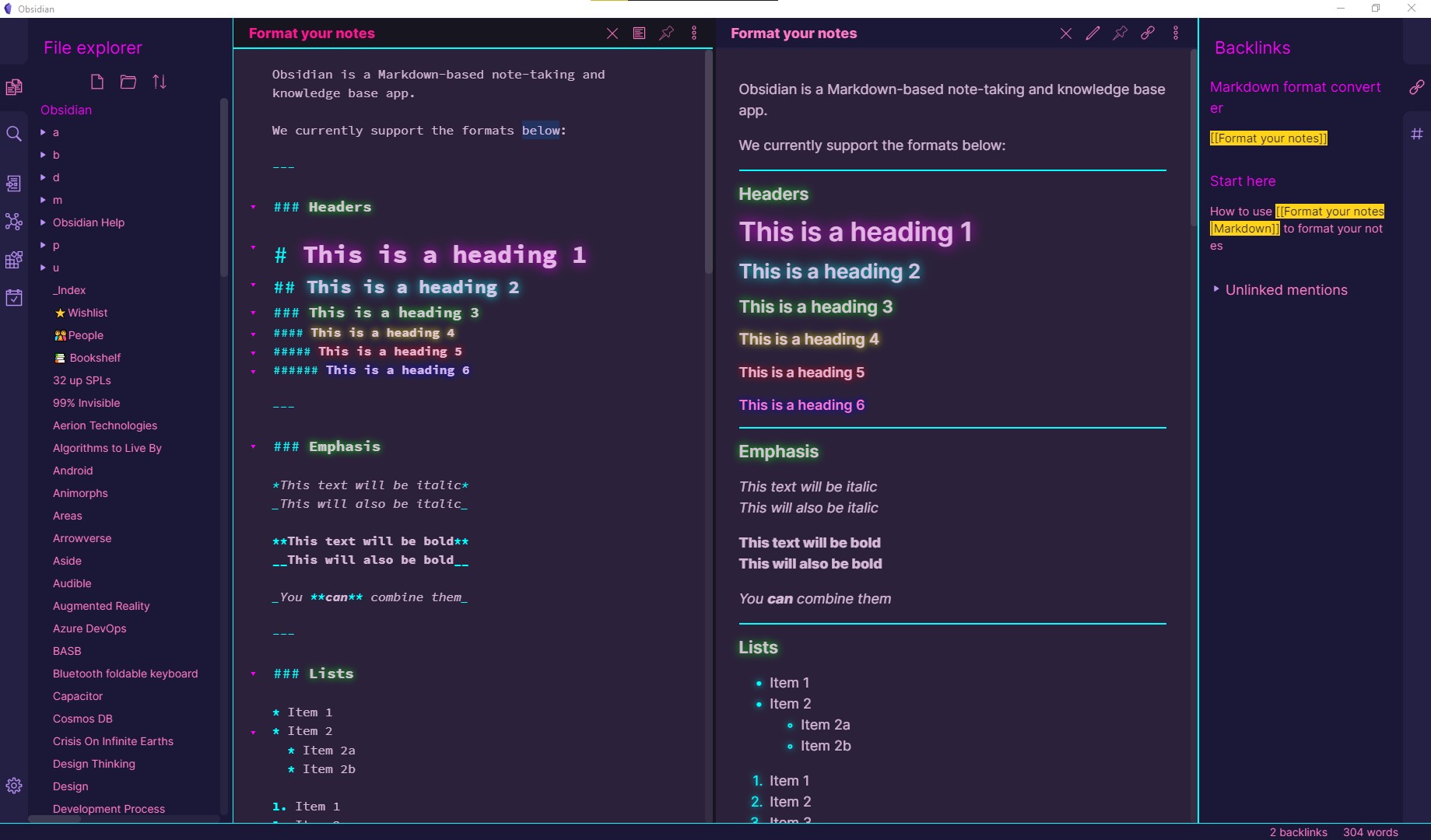
So much this. I think it's the number one problem that Roam, Obsidian, and this has. Without live-rendered markdown it's more mental overhead than it's worth.
Obsidians source code display is pretty close to preview quality, actually. Sadly they don't dare to feature this in the official screenshots, they are all in preview mode.
Here is a side-by-side to get the idea (the theme may be subject to taste, but it's not really relevant to the topic anyway, and there are a lot, less fancy ones as well):
Typora's markdown experience is great. I wish to see the same in VSCode. It isn't feasible to use Typora just for markdown and VSCode for other type of files.
I tried Dendron in the past, solid tool. I personally use Obsidian and would recommend it over others like Roam. It is super fast and super responsive.
Advantage that Dendron has is that it is based on VSCode which is fantastic foundation. Pretty much why I love Obsidian, you type fast and can work on ideas quickly.
I personally couldn't care less about graph, it looks pretty but to me not useful at all.
Good thing about tools like this is that you can sync and backup text files.
Bad thing is that having mobile app would be difficult. However, I use IAWriter to write into type of Inbox on my phone and this file is in Obsidian (again same workflow like Dendron)
To me personally, Dendron is too similar to existing one I am using, otherwise solid tool and would recommend to people.
I met Kevin at the YC hackathon last year and first heard about Kevin's ideas around note-taking there. I'm really enjoying Dendron so far.
The biggest thing for me is the lightweight structure- I would have never created a hierarchical structure if I had to create multiple nested folders every time I wanted a new category.
We should catch up sometime, it's been too long :D
It's not the same as mobile support but currently any markdown enabled mobile app can support writing to Dendron.
Here are a few apps that my other users have suggested: https://dendron.so/notes/401c5889-20ae-4b3a-8468-269def4b486...
I wish Obsidian supported mobile devices, Github based versioning and cross-device synchronization.That would be the perfect note taking app for me. Is there such alternative? I want the graph view too.
I use GitHub with my Obsidian vault for versioning and cross-device synchronization. I wish there was a mobile app as well, but GitJournal has been sufficient so far.
Enjoying Obsidian at the moment, will keep an eye on this one too, but honestly can't justify the switch away (note-taking is such a habit-based, "flow" tool) unless there's a _significant_ advantage to Dendron.
I guess everyone values something different. I am happy to pay for these tools, and even have them closed-source, as long as
(1) it can run locally, "offline", and
(2) the format is open (index-able text, whether one file or many)
at the end of the day, if you have a note taking tool that you like and are using, then my advice is to stick with it. that being said, we'll be launching an obsidian importer next week to make it easy for folks to experiment with dendron if the temptation strikes :)
foam is a note taking tool heavily modeled after roam research and backlinks. the core foam extension mainly focuses on stitching together third party extensions for most of its functionality.
dendron is also, in part, inspired by roam (backlinks, daily journals, etc) but is built around the notion of [hierarchical note taking](https://www.kevinslin.com/notes/3dd58f62-fee5-4f93-b9f1-b0f0...). dendron takes the structure provided by well built hierarchies and combines it with the freedom of roam's backlinks and block references.
while dendron also relies on third party extensions, the majority of functionality is inside the dendron extension. you can refactor notes via regex (dendron will update both backlinks and file names), lookup your notes via their path, apply schemas to categorize your notes, and much more.
One of Dendron's main innovations is how it handles note namespaces. While most apps with hierarchy separates titles linearly with folders for nesting, Dendron separates note titles among both an x and y axis, along with a nesting hierarchy. What results is a nicely organized navigation sidebar for choosing notes to open, as well as ease of naming new notes and adding on to existing notes.
Foam seems to be Obsidian ported to VSCode, minus several features and without a searchable graph view.
Foam can be setup and run hierarchical. I use this setup for mine with broad groupings at the top (history, medicine, politics, etc) and then subgroups as needed (history -> pandemics, history -> wars, etc). You can use foam-doctor to regenerate paths and titles on a regular basis.
Hacker News loves their note taking apps. I've seen at least a dozen apps this year that have solved the exact same problem in just about the exact same ways.
Am I the only one that still uses pen and paper? To me, there's a certain je ne sais quoi about closing my laptop and putting my phone away, grabbing a pen and my notebook, and brainstorming without technology.
I do most note-taking on paper. Problem with paper is that it's not searchable, as I discovered to my cost trying to find some specific reference details for a job I did last year and am repeating today. My problems are probably more due to ad hoc disorganisation - particularly, sometimes going off-piste and making critical notes on random sheets of paper, away from my main notebooks.
I'd love some kind of e-paper solution, in a notebook form, but I've no idea how it could gracefully and capably mimic the act of turning pages and having a chrono-spacial awareness of where the content in each of those pages lie.
In some far future we'll have paper-thin writeable electronic displays and can literally make a notebook to rule them all, but it'll be a while. And even then, likely very expensive.
> Problem with paper is that it's not searchable, as I discovered to my cost trying to find some specific reference details for a job I did last year and am repeating today.
Our brain works wonders, yet mysteriously.
I can somehow locate notes I wrote by hand on notebooks years ago. I remember the sketches, the color and size of the notebook, the location on the shelves ... and sometimes, finding the note isn’t important because I have actually memorized it.
It could a visual memory thing, reinforced by 20+ years of pen and paper school system. Were I 20 years younger and having been taught on tablets/xxx, I could have developed a different long term memory system. As of today, writing down notes on my computer feels like offloading my brain to disk. When writing notes of paper/iPad, it feels like writing to my brain.
I definitely agree that our brains work wonders and I'm not denying the main point you're making at all, but there is also an element of confirmation bias inherent here because you'll never look for the notes you don't remember taking. Going over old notebooks I've been astonished at the patterns I've uncovered of thinking about similar ideas and having similar insights over and over, each time not recalling that I've been on the same path at an earlier time.
Oh you are right for sure but it’s a whole different point.
I don’t know how our memory works and I guess our passion / interest plays an important part, as your conscious thoughts revisits those subjects as a routine.
I am just noticing how the multidimensional characteristics of hand written notes seem to provide “more ways” to search and explore our memory. Just like having both a spatial and a full text indices.
I employ a simple version of the bullet journaling method. I maintain an index at the beginning of the book where I add topics and the page numbers that I have information about it on. Still not ctrl-f speed of course, but I am not flipping through my notebook trying to find the right page. For your situation, I'll probably right down the job reference on the page of the day, and then add a `Job References` entry in the index and add the current page number beside it. At the end of each year, I'll digitize everything important for archival purposes (usually very little), and move over ongoing collections (like book list), to the next notebook.
I have thought about this in the past, keeping it all documented on notebooks, but indexing is one part that has made me question how to organize them.
This sounds sort of like what Remarkable[0] claims to be (not affiliated). I pre-ordered one because I'm very similar with my notes - I have a ton of ad-hoc notes taken on legal pads floating around.
Request for HN submission: in-depth Remarkable 2 review after months of daily use. Have they got a good data format & transfer story? Does the tech work?
Context: every time Remarkable hits Hacker News I'm intrigued, but I couldn't pull the trigger on a pre-order. I love the idea they're selling.
I too would appreciate such a review. I have a preorder for v2 but no experience with the first version of the device.
The customers at the top of the preorder queue for v2 got their tablets about a month ago[1] so the number of people able to write such a review will be limited for the next month or so.
Worth noting there is open source tooling for modding/ssh access to remarkable tablets[2].
Most notes I don't need to look at ever again after they've served their purpose, be it a month or three minutes of use. For the ones that do, I will use my notes to write a digital writeup, usually with more detail and references throughout with the explicit intention of making it comprehensive for when I forget everything in 6 months. I find the process gives me all the benefit of paper and all the benefits of digital, but supercharged because I am recalling from a written note at the same time to synthesize these ideas into a new format.
Has anyone found a good method of taking photos of notebook pages? I used to user Evernote, and even experimented with their proprietary OCR dot paper but it never really stuck because Evernote isn't great (and the searchability of words sucked)
But what are pen and paper but really old technology? :-) And given they were able to revolutionize human thought, it seems possible that other such wins are out there, waiting for us to find them.
(I do agree with the sentiment that pen/pencil are currently the best we've got along multiple axes, probably with the exception of search.)
And technology that some people were suspicious of in the past. If I recall correctly, Socrates was not strongly in favor of writing. He thought its use would weaken the memory. And there is some evidence people in cultures without writing have much better memories. So no technology is without it downsides.
When I went back to school to get my CS degree, I developed a pretty strict habit of only taking my lecture notes by hand, usually by printing out the lecture slides in advance and then annotating them with a bright turquoise fountain pen ink. Nowadays, for work, I use Org mode. Apart from the convenience of always having it to hand in my editor, being able to insert hyperlinks in my notes to specific lines in our source code is a game changer.
I'm the same, a lot of personal projects have notes on paper.
But I've been keeping a daily work-journal for the past few years, and that has been very handy. I have one org-mode file for each company I've worked in, and each day I insert a new block with headings that make sense "Meetings", "Stories/Tickets/Projects", "Problems", etc.
I make notes of commands, recipes, and tag things literally so get an integrated tag-cloud and this is exceptionally useful when I want to lookup how I did something a few months ago, or more!
You need to evaluate the lisp at the bottom of the file, so that `M-x new-day`, `M-x today` and the other stuff gets loaded.
I've got a bit of code in my init-files that does that automatically, that's linked to in the readme. But as a quick alternative you can scroll down to the end, to the line that starts:
"(defun new-day"
Select that line, and all the way down to the line that reads "(require 'ob-org)", and then run "M-x eval-region". That will evaluate the region and make the two new commands available.
Otherwise copy and paste the lisp from here into your emacs init file, and reload everything:
That will cause anything named `skx-startblock` to be evaluated automatically from an org-file on-load, and will also run the contents of `skx-saveblock` before saving any org-file, if present.
I have a table which contains all the distinct tags which have been used within the document, along with a count of how often they've been used. Clicking on the tag-name shows all the places it is used - via org-tags-view.
I guess I call it a tag-cloud, even if it isn't formatted like one would imagine on a web-page.
No package, just a bit of lisp-magic. I'd be happy to share an example if it were useful.
Nothing beats the fluidity, ubiquity and the sheer aesthetic quality of pen on paper. Excellent for diagrams and notes as I am discussing something on a call, or explaining things (mostly yo myself) consuming information dense video or audio content.
But I don't always have my notebook on me, and I tend to loose bits of paper easily. So to capture thoughts, I use "email thyself" on my phone.
Every once a few weeks, I clear out my inbox. Most notes go to junk. Some get cross referenced. Fewer still become actual files in my git repo.
My git repo is just a versioned bunch of files with upto 2 levels of hierarchy.
This works amazingly well, for capturing information. no lock-ins, no fear of losing content, frequently gets cleaned up and cross referenced with version history (which I dont mind losing as I have dates in the text files themselves).
What I haven't figured out (yet) is a sustainable way to regularly go back to the content I've collected to keep them rolling through my memory without it being an overwhelming amount of work.
Refreshing things regularly is the best, most effective way to find patterns and make better connections. Haven't broken that code yet.
My coworker exclusively uses pen and paper, I don't know how she does it. I keep a little throw-away notepad around for brainstorming / diagramming, but nothing beats a keyboard & mouse for text manipulation.
Cons: Not searchable, not interconnected, following references is very slow
Pros: There seems to be something inherently meaningful (read: brain lights up, it’s got sensory depth and intellectual weight) about doing tactile pen/paper notes since many people report better engagement and higher retention when doing pen/paper (myself included)
I use pen and paper for heavy brainstorming, specially when thinking about abstract concepts. But, at some point, I need to sit at the computer and put those notes in order.
I have never used note taking apps though. I normally just draft some text, prepare some slides, or write some pseudo code if it is a coding problem.
> I've seen at least a dozen apps this year that have solved the exact same problem in just about the exact same ways.
They only solve the problems the same way when viewed from distance. If you look closer, there often is a significant difference in some details which make them fundamental different tools.
> Am I the only one that still uses pen and paper?
I try it from time to time, and then fail over the shortcomings of paper. Additionally, with paper it's hard to manage digital content. Having a unified system for everything, that on top can even be automated is the real endgame of personal data managment.
> and brainstorming without technology.
Brainstorming is something differnt. It generates temporary data which you can throw away after wards. For this of course is paper better or a whiteboard. But you are supposed to clean up the results of the brainstorm-session and make something more lasting out of it, and for this digital media is better on long terms.
Yep, visually ̶s̶h̶i̶t̶t̶y undistracting, lightning fast, available everywhere and dead simple. Want hierarchy? Make folders. Want to cut across the hierarchy? Make links. Want to search? Use a search tool. (You can even use grep now in a WSL session.)
- note taking as building a knowledge base (ex: 'how to add a route permanently in CentOS') where pen & paper is clearly inferior (not searchable, not available everywhere once it becomes bigger than a notebook)
- brainstorming and here I would argue that the first step is just thinking before writing anything.
Every time a new note app is suggested, I get deja vu here. HN quickly jumps into the alternative apps, pen and paper, longhand and memory retention, image and link insertion, searchability vs marginalia, org-mode, and those who covet the almighty e-ink solution.
Note apps and todo list apps. There are a million ways of thinking about personal information and no chance that we’ve explored the full space (UX, focus, features, integrations) yet.
- I made one around 2007. Perfect for a niche, but there are infinitely many niches.
If anyone can help. I am looking for note taking application that can fulfill the following requirements:
- Plain-as-in-Plain Text - meaning I don't have to export my notes as JSON or XML or something else. Each note is a single .md or .txt file.
- Full-text search
- No Markup Lock-in - Meaning, for example, that I can use any flavor of Markdown (in my case MultiMarkdown) that I'd like and export/preview/build the file elsewhere.
- Preferably Mac native...or anything not Electron if necessary
- Wikilinks, please
The Archive fills these needs but after looking at their Roadmap, I've realized that I have no intentions of paying for an upgrade when V2 is released and I do not want to risk V1 slowly becoming a mess to operate somewhere down the line if I can find an alternative. The Archive is great because it's simple and it's core but can be extendable if necessary.
Obsidian is nice...but has too much going on for my liking. Same with Org-Roam.
The joplin API works pretty well from my experience, although the note to note linkage is not great.
The export of notes dumps as guid.md file name.
I personally like it because it has the features I want, works well on mobile, local first backed up by sync (you provide the target) and the API isn't hard to use.
I was strongly considering Joplin the other day. I see it mentioned a lot at different sites. I respect how simple it is. The common trends seems to be based on stuffing as much features into an app to please the "Second brain" crowd, but I just want to take notes, I don't necessarily need all the graphs and glitter. Thank you.
It's under pretty heavy development and there is certainly some scope creep, but it's never impacted my core usage.
At least for me right now full text search, no lock in, good phone support and sync that works is all I need to build a good note taking habit.
IMO the value that you get from going from not taking notes to taking notes is much bigger than the value jump you get if you go from taking unstructured notes to structured notes .
Interesting. But, I'm surprised no one mentions the 'originator' of this type of application: TheBrain from TheBrain Technologies LP. Perhaps because this is closed source commercial product?
This product and approach was invented over 20 years ago and has all the features mentioned. One use case, Jerry's brain, has over 500K nodes and is still useful graphically.
Two problems with these types of things is
1. the graph is most useful on large displays. I have not tried the mobile apps. On a large data set I would imagine scrolling and zooming would be needed.
2. Search is still a key feature. Even with fully linked graph structure, finding something would take too long, 'tip of the tongue' recall problem.
I think Dendron is on to something great here - it's not just about note taking, it's also about highly efficient retrieval of notes. I have poked around it, but I intend to take a deeper dive and think about how I can make it part of my process.
One of my reasons for creating Dendron is that while all note taking apps (try) to make it easy to put notes in, they all make it hard to get them back out, especially as you add more. It didn't make sense to me, especially since like code, I tend to spend more time reading notes than writing it
I've methodically used many of the available notetaking apps in the past year- Dynalist, Roam, Remnote, Obsidian, and Siyuan, on top of several years of using Onenote, Evernote, Trilium, and Joplin. The three criteria that I've found to best sum up the notetaking experience are 1) Friction in capturing a new thought 2) Friction in finding a previous thought and 3) How memorable the note structure is. I've found Dendron to have subtle but well throught-out features that gives it a strong balance in these uses, standing out from the rest.
Dendron solves the problem of visually organizing notes
Ive always had an issue with too many notes with all different titles, creating giant dropdown menus in the sidebars of note apps. My Google Docs documents list needs its own table of contents. It's not an issue anymore because Dendron's organization brings in an X-axis to the formerly single direction binary tree organization, and I've been using that to keep my nav sidebar clean.
Dendron's "schema" syntax looks just like the .JSON or .OPML outputted by a mind mapping app. Dendron creates a graph/mindmap not of the individual notes, but of the organization of the notes. So it represents the ontologies and "phylogenies" of knowledge as a map, just like how my mind does. There's something more memorable about navigating to your notes from a map, than from a table of contents or by ctrl-F.
Dendron allows you to create new notes that "branches" off the namespace of an existing note. I use this to seperate source material and my own annotations on subjects. It supports my dream of having my own frictionless intranet to take notes on. I use the Markdown Clipper browser extension copy entire webpages into Dendron. When I look up something up on UptoDate.com, a pretty dense medical database, I just copy the whole article into Dendron.
Next time I look up the same topic, I head for my Dendron note, and use link to make my own mental wikipedia out of what I understood out of the information. Then when I want to review a topic, give a presentation, or make a review outline, can reference in my own notes plus the original context where I read the information in the first place.
Also, Dendron integrates well with the VSCode to Anki extension.
On the website you mention using it in conjunction with other note taking tools. How do you envision using Dendron in conjunction with another note taking tool like Roam?
Dendron has a notion of pods - plugins you can use to import, export, publish and (soon to come) sync data between different tools of thought. These plugins can be written and share using nodejs and are meant to provide interoperability between dendron and other tools
Having a graph-based interface for the relationships is nice.
But i think this works best with big monitor (think 43'') and when the graph is the main interface, not just a small window somewhere.
I.e. display the content of nodes directly in an infinite-pan&zoom graph view.
Code reading could be nice this way. I suppose mentally one builds up a similar graph everytime reading through code. And eventually get lost. One can hold only so many things in flesh(sic) memory...
I'm planning to create a (probably written in Vulkan, so it will be ambitious...) project where I want to leverage modern 3D graphics for displaying potentially very large graphs in an intuitive & interactive way. I'm trying to target use cases such as note taking and mind-mapping as well as code browsing and git repo browsing as I see many potential ways to create visualization capability (via unification) across the multiple abstraction layers (many of which involve graph structures). E.g., git tree is a DAG, and the nodes on there are source file trees themselves. We could view a list of GitHub PRs on a repo as a list of nodes which point into locations within the repo's git tree. It's turtles all the way down, since source files can themselves be decomposed into ASTs, and those yet further into syntactical trees.
I imagine that with common workflows (one of which I just proposed) without the barrier of context switching could be a big win. At a certain zoom level I'm envisioning being able to directly see which portions of source are touched by the different PRs for example.
Another example of this is in applying this toward file browsing and the management of backups (i'll want to sprinkle tree differencing visualization in there).
Some thoughts:
Source code should be able to fall back to editable text when necessary.
Multiple Projections to view/interface the same data with different views must be possible.
Optimal would be that it integrates any editor I'd like (I want sublime, others not so much). Ideally other file formats like word documents, latex documents etc. should also be supported. But that sounds very hard, basically makes the whole thing an infinte pan zoom graph based window manager (with all the other graph related features).
Hm.. Maybe this all really is on the operating system level.
I favor html as base technology for the reason of easily including different "apps", like code editors, pdf viewers, webgl content, etc.
But thats just because I don't really want to develop this at the window manager/operating system level... Honestly I feel html is too slow for what I really want. There is a reason I use sublime and not VSCode, even it is just a millisecond or so.
I hope more people think in similar directions with the graph based interface. May one day some hero actually succeed with what we envision.
I encourage you to be that one!
One more thing:
I am also toying with the idea of using Jupyter notebooks as a starting point. One could relatively easy derive relationships between code cells and display them in graph based view instead of linear sequence. Then go further and add projections for AST.
Wow! Another knowledge base tool :). I'm working on https://github.com/Uzay-G/archivy and am especially excited about the new plugin system [0] that'll be ready soon.
On an semi-related topic, has anyone seen HTML+CSS (non-JS) versions of node relationship displays?
I'm working on a knowledge store and so many of the node/graph navigation tools are heavy JS libraries. I'd like to implement a pure HTML one for ultimate lightweight, but i've never seen one - so i'm struggling on inspiration.
It is bloated. High latency, uses unnecessary disk space, high on resources. My default editor is either Sublime or Vim (usually Vim but sometimes I prefer Sublime). VSCode as dependency is a dealbreaker for me.
So I was happy to read this on Dendron website (author linked it elsewhere):
> That being said, the core dendron engine is not vscode specific and there are folks that are experimenting with porting it over to other editors (eg. sublime, vim). We also have plans for a standalone editor in the future (most likely, this will be a fork of VSCode optimized for note taking)
I remember I tried this one some months ago and was driven of by the obscure and pointless design for their note-managment. But otherwise it seemed like a very active and dedicated projects. And their Server Migration-plan is a promising future. So let's see how it will unfold next years...
I used to have a PersonalWiki (https://web.archive.org/web/*/http://zby.aster.net.pl/kwiki/*) running off my desktop in my living room, but it was too cumbersome to keep my own server especially when I was working abroad. I switched it off, and then my backup drive failed - I have only what was saved in the Archive. Then I had a blog on Blogspot - but Google neglected it and I started to have problems with logging into the blog editor (even though I used gmail constantly) - it still is there: http://brudnopis.blogspot.com/ but I probably cannot access the editor. Then I started a blog at Medium: https://medium.com/@zby It kind of works - but I hate the fact that to be a fully supported author I have to put my blog behind their paywall. I understand the need for a business model - but this one does not work for people like me, who write because they have something to say and not because they try to make money directly from their writing. And I am afraid it is those amateurs who write the best blogs - now the core of Medium writers seem to be some aspiring professional writers who just compile "10 things that ..." or try to build a "story" out of any mediocre thought.
I also started a paper notepad with Zettelkasten method - I have some notes there, but I haven't established an effective habit for it. I'll see how that develops - but I still want to publish my thoughts.
I wish I stayed with my PersonalWiki - I feel a need to constantly add and modify the articles even after publishing them. But the ideal would be something that works like: https://www.gwern.net/About - now I understand the need for a LongSite (https://www.gwern.net/About#long-site).
There are many contenders presented in this discussion here, with lists of features, what is lacking from these analyses is the business models that would give me a feeling of security for my potential LongSite.
Argument mapping is a good technique. I was expecting to hate it but it was very helpful when reading the Institute of world politics's summary of the cases for and against Roger Hollis.
Same, I open my notes/ folder in iCloud drive in VSCode and edit markdown files from there. I paid for a markdown notes app (iAWriter) for my iPhone so I could edit from there.


I really hope a true VSCode competitor will emerge in the future that is truly open source and not controlled by a company that does not have its users best interests in mind; all this Linux-friendly stuff Microsoft is doing lately is to basically get people into their ecosystem and then slowly push out Linux and other alternatives (e.g. who's using sublime / atom anymore?). There is some pithy name for this strategy that escapes me, but effectively it is the equivalent of dumping in commerce: use one's cash reserves to sell a product at a loss in order to squeeze out competitors, then capitalize on the cornered market (i.e. "All Hail Microsoft!" after trying to squeeze out others).
I really wish the Xi [0] editor gained more traction, though as an Emacs user I'm hoping the speedup with v28 and the GccEmacs [1] go a long way there. I would certainly like more parallelism though, e.g. `dired` mode not pausing the entire editor when moving a large file, and I've never really become fluent in elisp.
[0] https://github.com/xi-editor/xi-editor [1] https://www.emacswiki.org/emacs/GccEmacs